ferro
Lead
October 14, 2024
Solved

How to show 'Pespective Icons' in a toolbar

  • October 14, 2024
  • 1 reply
  • 1048 views

Hi,

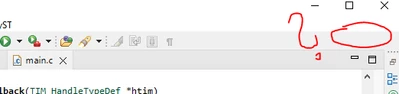
The pespective icons have dissapeared, how to get them back please ?

Thank you

ferro_0-1728905838538.png


ferro_1-1728905912135.png


Best answer by Souhaib MAZHOUD

What version of CubeIDE are you using?
Could you try to reset perspective under [Window]>[Perspective]?

1 reply

Technical Moderator
October 14, 2024

Hello @ferro 

You can add perspective icons from: [Window]>[Perspective]>[Open Perspective]>[Other…] and select the perspective to use.

Thnx 

Souhaib

To give better visibility on the answered topics, please click on Accept as Solution on the reply which solved your issue or answered your question.
ferro
ferroAuthor
Lead
October 14, 2024

Thank you @Souhaib MAZHOUD , good to know.

However, what I am asking is how to show the icons as they somehow are not in my toolbar.

ferro_0-1728913704878.png

How can I bring the perspective icons back ?


Souhaib MAZHOUDBest answer
Technical Moderator
October 14, 2024

What version of CubeIDE are you using?
Could you try to reset perspective under [Window]>[Perspective]?

To give better visibility on the answered topics, please click on Accept as Solution on the reply which solved your issue or answered your question.