
Associate
April 20, 2025
Solved

IDE Theme and appearance
  • April 20, 2025
  • 2 replies
  • 917 views

peradheep_0-1745168125804.png

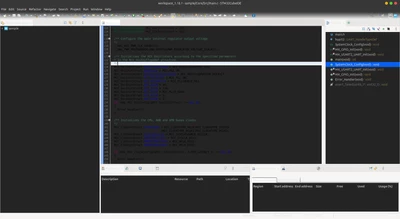
How to change this theme, i couldn't find any settings related to this, i have tried all the colors and font settings, it comes default after installing STM cube IDE as fresh start. Somebody please help with this ?
i have tried with ecllipse marketplace "Darkest theme" which i have installed, but it didn't apply , checked with settings under version control
Best answer by AScha.3

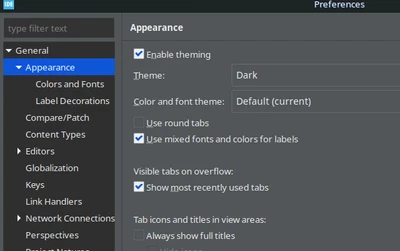
Set Dark  in   menu : Window -> Preferences -> General -> Appearance

AScha3_0-1745182531567.png

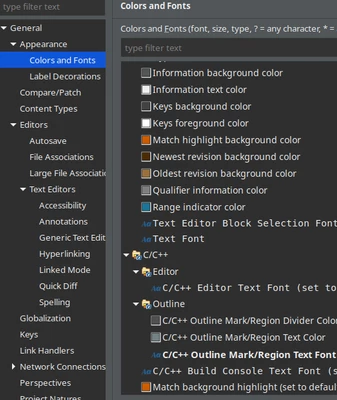
+ change details...if you want :

AScha3_1-1745182817578.png

+ IDE needs restart, to get all colors set .


2 replies

TDK
Super User
April 20, 2025

Themes are under Window -> Preferences -> General -> Appearance.

TDK_0-1745168830743.png


"If you feel a post has answered your question, please click ""Accept as Solution""."
peradheepAuthor
Associate
April 21, 2025

Thank you, it worked and then how to apply eclipse marketplace themes, i have installed from that but it doesn't make changes  

AScha.3
AScha.3Best answer
Super User
April 20, 2025

Set Dark  in   menu : Window -> Preferences -> General -> Appearance

AScha3_0-1745182531567.png

+ change details...if you want :

AScha3_1-1745182817578.png

+ IDE needs restart, to get all colors set .


"If you feel a post has answered your question, please click ""Accept as Solution""."
peradheepAuthor
Associate
April 21, 2025

Thank you, it worked

mƎALLEm
Technical Moderator
April 21, 2025


Hello @peradheep and welcome to the ST community,


@peradheep wrote:

Thank you, it worked


Please accept as solution the comment that answered your question.

Thank you

"To give better visibility on the answered topics, please click on ""Accept as Solution"" on the reply which solved your issue or answered your question."