Explorer
August 26, 2025
Solved

IDE View and MX Generate

  • August 26, 2025
  • 1 reply
  • 267 views

Hi, 

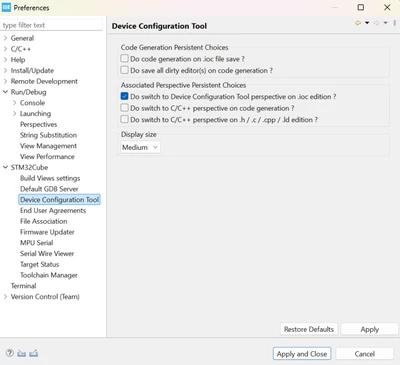
1. I want ti have auto view change for C, MX and Debug windows. Previously a promt used to come. Now I dont see that.

2. I want to generate MX automatic on save. Previously a promt used to come. Now I dont see that.


Best answer by Ghofrane GSOURI

Hello @GHK 


As far as I know, these features are already available in the IDE. If you are no longer seeing prompts for automatic view changes between C, MX, and Debug windows, or for automatic MX code generation on save, it’s possible that the relevant settings have been changed or disabled.

I recommend checking the IDE’s preferences to ensure these options are enabled:

1- Go to the menu bar and select Window > Preferences.
2- In the Preferences window, expand STM32Cube in the left panel.
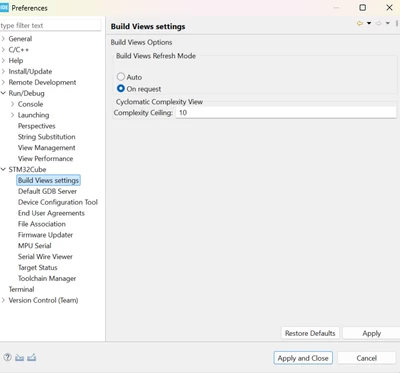
3- Review the available options for view switching and code generation, and enable or adjust them according to your preferences.
GhofraneGSOURI_0-1756194161865.pngGhofraneGSOURI_1-1756194178308.png

THX

Ghofrane

1 reply

Ghofrane GSOURI
Ghofrane GSOURIBest answer
Technical Moderator
August 26, 2025

Hello @GHK 


As far as I know, these features are already available in the IDE. If you are no longer seeing prompts for automatic view changes between C, MX, and Debug windows, or for automatic MX code generation on save, it’s possible that the relevant settings have been changed or disabled.

I recommend checking the IDE’s preferences to ensure these options are enabled:

1- Go to the menu bar and select Window > Preferences.
2- In the Preferences window, expand STM32Cube in the left panel.
3- Review the available options for view switching and code generation, and enable or adjust them according to your preferences.

GhofraneGSOURI_0-1756194161865.pngGhofraneGSOURI_1-1756194178308.png

THX

Ghofrane

To give better visibility on the answered topics, please click on Accept as Solution on the reply which solved your issue or answered your question.
