

freddy
Associate
April 10, 2025
Solved

Incorrect path .elf file

  • April 10, 2025
  • 3 replies
  • 541 views

Recently I changed from Windows to Linux. Now I'm working on a older project and when debugging I got the message "program file does not exist" wit the details:
.../Projects/VxxT/VxxT_firmware/Debug\VxxT.elf not found
I've found that the problem is the backslash in the path and that this is an artifact of changing operating systems.
My question is how to correct this so the IDE looks for the right file?
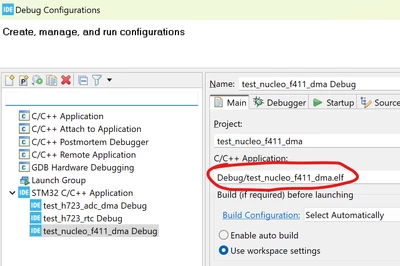
Best answer by TDK

Change it in the Debug or Run Configuration tab.

TDK_0-1744332060094.png


3 replies

Tesla DeLorean
Guru
April 10, 2025

>>My question is how to correct this so the IDE looks for the right file?

The software engineer in me says write a small app or script..

Check other project files which are working, against those that fail, compare and contrast.

Do I think that ST should sanity check this, and fix it, yes sure, but it would annoy me to edit a project file more than once to fix it.

Tips, Buy me a coffee, or three.. PayPal VenmoUp vote any posts that you find helpful, it shows what's working..
TDK
TDKBest answer
Super User
April 11, 2025

Change it in the Debug or Run Configuration tab.

TDK_0-1744332060094.png


"If you feel a post has answered your question, please click ""Accept as Solution""."
freddy
freddyAuthor
Associate
April 11, 2025

Thanks, that worked, the error is gone.

Pavel A.
Super User
April 11, 2025

Please review the project settings for the build artifact(s) and ensure that all slashes are / not  \, this will work even on Windows. Eclipse on Windows will take care to substitute these slashes, but it cannot always guess for the opposite direction. If you are brave, open .cproject and .launch files in a text editor and replace all backslashes there.