
Associate II
December 2, 2025
Solved

IOC File Not Displaying Diagram

  • December 2, 2025
  • 2 replies
  • 586 views

I upgraded STM32Cube IDE to 1.12.0, and now when I double-click the IOC file, it just displays a text file, not the processor pin / configuration diagrams, etc.  I tried closing and re-opening the project(s) and closing and re-opening CubeIDE.  No change.
Best answer by TDK

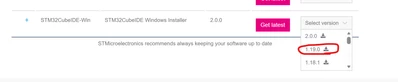
Probably your workspace was created in 1.12.0. It's just a directory name now, not the product version.

Yes you can downgrade if you want.

STM32CubeIDE | Software - STMicroelectronics

TDK_0-1764772678440.png


2 replies

TDK
Super User
December 2, 2025

STM32CubeIDE v2.0.0 does not support IOC files natively.

Use standalone STM32CubeMX to view and generate code.

STM32CubeIDE 2.0.0 released - STMicroelectronics Community

"If you feel a post has answered your question, please click ""Accept as Solution""."
RHJAuthor
Associate II
December 3, 2025

I'm a little confused about the version number.  The About page says 2.0.0 but the top of the workspace says 1.12.0.
Anyway, I'd prefer to have the config tool incorporated in the IDE.  Can I downgrade to 1.19.0?

TDK
TDKBest answer
Super User
December 3, 2025

Probably your workspace was created in 1.12.0. It's just a directory name now, not the product version.

Yes you can downgrade if you want.

STM32CubeIDE | Software - STMicroelectronics

TDK_0-1764772678440.png


"If you feel a post has answered your question, please click ""Accept as Solution""."
Karl Yamashita
Principal
December 2, 2025

1.12.0 is like over 2 1/2 years old. At least upgrade to 1.19.0

Starting with STM32CubeIDE 2.0.0, you'll need to use STM32CubeMX to create the IOC.

If a reply has proven helpful, click on Accept as Solution so that it'll show at top of the post.CAN Jammer an open source CAN bus hacking toolCANableV3 Open Source