Associate III
January 22, 2024
Solved

Is it possible to create a compile_commands.json file?

  • January 22, 2024
  • 2 replies
  • 7324 views

I work in a workspace but I use vim with clangd for editing my code. I am wondering if it is possible to create a compile_commands.json file and if so how. 
If the IDE uses cmake under the hood then it should be rather straightforward but I cannot understand how to proceed. 

see e.g. this:

https://cmake.org/cmake/help/latest/variable/CMAKE_EXPORT_COMPILE_COMMANDS.html


    Best answer by ubaldot

    I found an answer by myself, and it is YES.

    For those who may need it.

    Install a tool that can create a compile_commands.json from a makefile like compiledb or bear (in the following I will use compiledb)

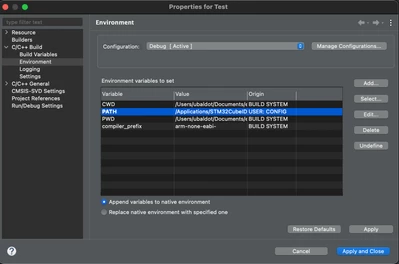
    1) Go on Project->  Properties and change add the folder where compiledb is installed in PATH as shown below.
     

    ubaldot_0-1706033627690.png


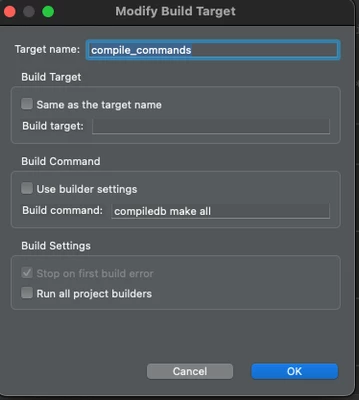
    2) Go to Project -> Build Targets -> Create... Uncheck all the options and add the custom command you need for creating the compile_commands.json file in the Build commands. 
     

    ubaldot_1-1706033783099.png

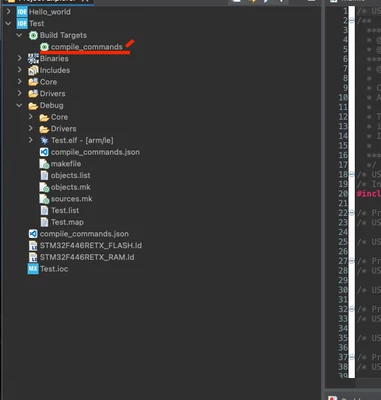
    3) Select the newly created target on the left hand side of CubeIDE, right click and select Build Target.
    ubaldot_2-1706033967166.png


    4) Once your compile_commands.json is created, you have to move it in the upper folder (root of your project). 

    You may have some error related to cyclomatic-complexity, but to solve this is enough to open the compile_commands.json file and remove all the -fcyclomatic-complexity entries.

    OBS! I have just discovered this method, so take it with a grain of salt. 

    2 replies

    ubaldotAuthorBest answer
    Associate III
    January 23, 2024

    I found an answer by myself, and it is YES.

    For those who may need it.

    Install a tool that can create a compile_commands.json from a makefile like compiledb or bear (in the following I will use compiledb)

    1) Go on Project->  Properties and change add the folder where compiledb is installed in PATH as shown below.


    ubaldot_0-1706033627690.png


    2) Go to Project -> Build Targets -> Create... Uncheck all the options and add the custom command you need for creating the compile_commands.json file in the Build commands. 


    ubaldot_1-1706033783099.png

    3) Select the newly created target on the left hand side of CubeIDE, right click and select Build Target.

    ubaldot_2-1706033967166.png


    4) Once your compile_commands.json is created, you have to move it in the upper folder (root of your project). 

    You may have some error related to cyclomatic-complexity, but to solve this is enough to open the compile_commands.json file and remove all the -fcyclomatic-complexity entries.

    OBS! I have just discovered this method, so take it with a grain of salt. 

    Associate II
    August 14, 2024

    Thanks for this solution.
    I'm trying to set it up but I got an error: make: *** No rule to make target 'compile_command'. Stop.
    Is there anything to configure with the makefile?

    ubaldotAuthor
    Associate III
    August 15, 2024

    It was long ago, but looking at the screenshots I don't think you need to change the Makefile manually.
    Have you done the step 2) correctly? 

    Visitor II
    August 18, 2025

    Hi, 
    I am using STM32CubeIDE version 1.19.0 and I have right clicked my project, gone to properties, C/C++ Build, JSON Compiliation Database Generator. ticked the 2 boxes and away it went.

    average_joe_0-1755502481752.png


    Visitor II
    August 18, 2025

    Although, I am finging out it does not work in headless mode. As if your building in a docker.... bug or feature?