DYann.1
Senior II
November 4, 2024
Solved

J-LINK SEGGER with STM32CubeIDE

  • November 4, 2024
  • 4 replies
  • 11508 views

Hello,

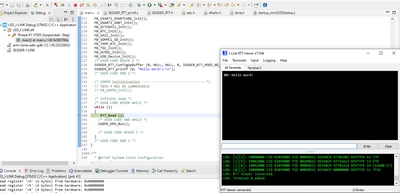
I would like to know How to configure the J-LINK Segger to work with STM32CubeIDE, after a little searching I found this video : https://www.youtube.com/watch?v=Rf-NKOoPYUc

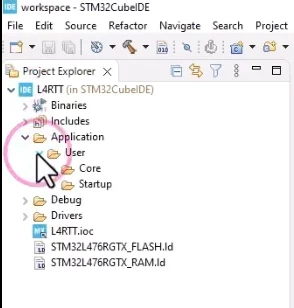
But at 12:11 I can see this configuration in the video             
DYann1_0-1730723182830.png

But I don't have an Application directory :
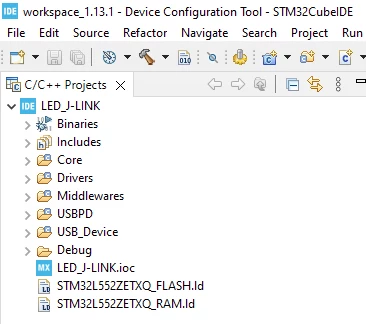
DYann1_1-1730723371353.png

In this case, do you have an idea how to do it ? Thank you for your helps.

Regards
Best answer by DYann.1

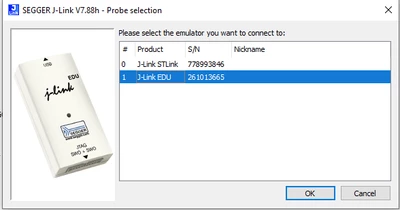
Hi, thank you every body now I can work with my J-LINK . In fact in any case I

DYann1_0-1730810299382.png

I still have to connect USB_STLK even if I don't use ST-LINK (from what I understand).

DYann1_0-1730811102681.png

operation is correct

4 replies

Andrew Neil
Super User
November 4, 2024
A complex system that works is invariably found to have evolved from a simple system that worked.A complex system designed from scratch never works and cannot be patched up to make it work.
DYann.1
DYann.1Author
Senior II
November 4, 2024

Let me look at this link. THANKS

DYann.1
DYann.1Author
Senior II
November 4, 2024

So how to find

DYann1_0-1730728743036.png

How to switch to an equivalent of this window ? I think the STM32CubeIDE is the old version.

Andrew Neil
Super User
November 4, 2024

What version of CubeIDE are you using?

A complex system that works is invariably found to have evolved from a simple system that worked.A complex system designed from scratch never works and cannot be patched up to make it work.
Andrew Neil
Super User
November 5, 2024

Your video is about how to set up RTT -  a Segger proprietary feature which works over the basic SWD hardware connection.

This error message:

AndrewNeil_0-1730798892823.png

tells you that it's the basic SWD hardware connection that's failing - it hasn't got as far as anything to do with RTT at that point!


@DYann.1 wrote:

Yes I have already made the evaluation card work with J-LINK but with USB_STLK, but for my projet I've another card that doesn't have US_STLK (for consumption and card size). 


So which one is giving the connection error - the EV board, or your custom board?

A complex system that works is invariably found to have evolved from a simple system that worked.A complex system designed from scratch never works and cannot be patched up to make it work.
DYann.1
DYann.1Author
Senior II
November 5, 2024

@Andrew Neil wrote:

This error message:

AndrewNeil_0-1730798892823.png

tells you that it's the basic SWD hardware connection that's failing - it hasn't got as far as anything to do with RTT at that point!

Yes you're right but I have already configured the tool now I will check again to see what it gives. After checking nothing is works 

DYann1_0-1730799834265.png

that I try to connect via SWD or JTAG nothing works, so it is normal that STM32CubeMX cannot communicate with the J-LINK

Andrew Neil
Super User
November 5, 2024

@DYann.1 wrote:

Yes you're right but I have already configured the tool


So this is not about the tool configuration - it is a basic hardware problem:

AndrewNeil_0-1730800264401.png


Are you also going to complain to Segger about giving you "useless" (sic) links?

AndrewNeil_1-1730800360432.png


@DYann.1 wrote:

so it is normal that STM32CubeMX cannot communicate with the J-LINK

When the basic hardware connection is not working, nothing which needs to use that connection can work!

A complex system that works is invariably found to have evolved from a simple system that worked.A complex system designed from scratch never works and cannot be patched up to make it work.
DYann.1
DYann.1AuthorBest answer
Senior II
November 5, 2024

Hi, thank you every body now I can work with my J-LINK . In fact in any case I

DYann1_0-1730810299382.png

I still have to connect USB_STLK even if I don't use ST-LINK (from what I understand).

DYann1_0-1730811102681.png

operation is correct

Andrew Neil
Super User
November 5, 2024


@DYann.1 wrote:

I still have to connect USB_STLK even if I don't use ST-LINK (from what I understand).


I'm not clear what you mean by that?

What do you mean by "USB_STLK" here?

You can only have one debug probe attached at a time.

Is this on the EV board, or your custom board?

Show  diagrams.

A complex system that works is invariably found to have evolved from a simple system that worked.A complex system designed from scratch never works and cannot be patched up to make it work.
DYann.1
DYann.1Author
Senior II
November 5, 2024

On my EV board first after I can switch to my real board. "USB_STLK" look on the evaluation card where the connector is located "USB_STLK"