Associate
January 9, 2025
Solved

"main.c" is not visible.

  • January 9, 2025
  • 2 replies
  • 973 views

"main.c" is not visible.

This is the screen I want.image02.png
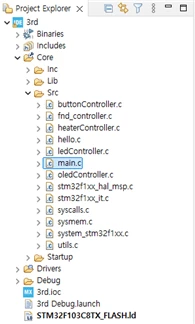
 

 However, this is my actual screen.

image01.png

 I am sure I have chosen the board correctly.

Best answer by Mahmoud Ben Romdhane

Hello @hjjang ,

Let me thank you for posting and welcome to the ST Community.

It seems that the STM32 firmware is not installed. Therefore, I recommend that you set the Network Connection and log to your ST account before generating the code.

I suggest that you take a look at UM2609 section 1.2.3 STM32CubeIDE user authentication.

Thanks.

Mahmoud

2 replies

Karl Yamashita
Principal
January 9, 2025

You're probably not importing the project correctly or there are some project configurations missing. What does the project tree look like in File Explorer?

If a reply has proven helpful, click on Accept as Solution so that it'll show at top of the post.CAN Jammer an open source CAN bus hacking toolCANableV3 Open Source
hjjangAuthor
Associate
January 9, 2025

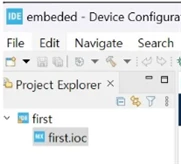
Is this correct?

제목 없음.png

Karl Yamashita
Principal
January 9, 2025

You have no source files so that is why nothing shows in the project tree

If a reply has proven helpful, click on Accept as Solution so that it'll show at top of the post.CAN Jammer an open source CAN bus hacking toolCANableV3 Open Source
Karl Yamashita
Principal
January 9, 2025

You need to describe how you're creating a project and which uC

If a reply has proven helpful, click on Accept as Solution so that it'll show at top of the post.CAN Jammer an open source CAN bus hacking toolCANableV3 Open Source
Technical Moderator
January 9, 2025

Hello @hjjang ,

Let me thank you for posting and welcome to the ST Community.

It seems that the STM32 firmware is not installed. Therefore, I recommend that you set the Network Connection and log to your ST account before generating the code.

I suggest that you take a look at UM2609 section 1.2.3 STM32CubeIDE user authentication.

Thanks.

Mahmoud

To give better visibility on the answered topics, please click on Accept as Solution on the reply which solved your issue or answered your question.
hjjangAuthor
Associate
February 17, 2025

image02.png

I had to install the software pack as shown in the picture.

Thank you very much.