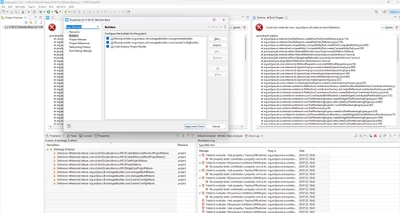
Missing Builder and Project Settings after installing Toolchain (7-2018-q2-update)
I am using the following setup:
- STMCubeIDE1.6.1 on Windows 11
I see the following behavior
- Opening the IDE with the default Toolchain and my Project for 1.6.1 works fine and build. However, I need to use the GNU Tools for STM32 (7-2018-q2-update)
- I install it with the Toolchain manager which works. Then I have to restart the IDE for the Toolchain to become active.
- After the restart the IDE is missing the usual C Project settings like Build C/C++ and the Toolchain manager. (see Image). Furthermore I get the 'Missing builder indication under the 'Builder' settting.
- Strange enough using this Toolchain works with newer IDE versions like v1.10.1 for other projects but I need to use v1.6.0 or v.1.6.1
- Only reinstalling the IDE can fix the issue.