
Senior
November 28, 2024
Solved

multiple .jxbrowser -* folders are eating my drive space

  • November 28, 2024
  • 10 replies
  • 7554 views

Hi all.  I have been witnessing a rapidly shrinking amount of free space on my C drive.  On a regular drive clean up of non-essential data, I can generally remove 1 Gigabyte or so of temporary files.  This however, does not account for the rapid depletion of available free space. 

On further investigation, I looked into the 'Other' (Manage other large folders) section of the 'System -> Storage' properties of my Windows 11 C drive.  I was a little gob-smacked to discover that - between them - the ST related folders: stm32cubeide, stm32cubemx, STM32Cube and ST contain over 100Gb of data.

Obviously allowing for software packs and the various STM applications in daily use, I found a considerable amount of data was held in several .jxbrowser folders across more than one location.  For example, the .jxbrowser-7.38.2 folder inside the stm32cubemx directory - alone - is at a whopping 17.5Gb.  I don't see any way of cleaning them or whether or not it is safe to do so but I read elsewhere (on other sites) that they should be left alone.  The screen grab below indicates the total size of the multiple .jxbrowser folders in stm32cubeide: 
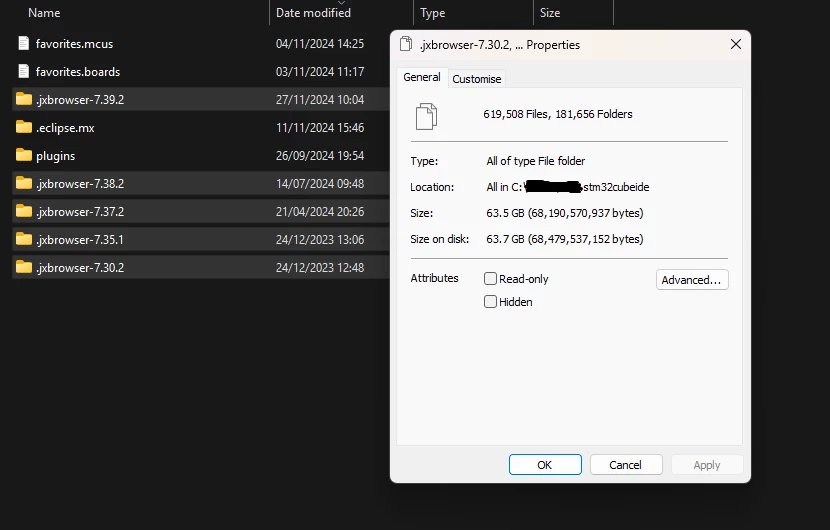
Screenshot 2024-11-28 100508.png Does anyone else have any experience with this?  Better still, if there is a solution I would love to know what it is, hopefully before my drive gets chockers-full.   Thanks in advance.     

Best answer by Mahmoud Ben Romdhane

Hello @Al-E-Bags 

Thank you for bringing this issue to our attention, I am escalating an internal ticket (197324 for internal follow-up) 

and it will be fixed as soon as possible.

Thanks.

Mahmoud

10 replies

Technical Moderator
November 28, 2024

Hello @Al-E-Bags ,

First let me thank you for posting.

Your request is under investigation, and I will get back to you ASAP.

Thanks.

Mahmoud

To give better visibility on the answered topics, please click on Accept as Solution on the reply which solved your issue or answered your question.
Technical Moderator
November 28, 2024

Hello @Al-E-Bags 

Thank you for bringing this issue to our attention, I am escalating an internal ticket (197324 for internal follow-up) 

and it will be fixed as soon as possible.

Thanks.

Mahmoud

To give better visibility on the answered topics, please click on Accept as Solution on the reply which solved your issue or answered your question.
Egolt.1
Associate II
December 14, 2024

Hello,

Any update on this issue?

Is there a way to clean it manually without harming existing projects?

Thanks! 

Al-E-BagsAuthor
Senior
December 14, 2024

@Egolt.1 It is possible to keep the issue under control to some degree.  I manage it by deleting the folders with the oldest content first but stop way before the most recent (just to be safe).  I haven't noticed any negative impact on my system by doing this but I can't say with any certainty whether or not it's good practice.  If I recall correctly, last time did this, I removed some 720,000 separate files.  I just knew I had to free up some space somehow.  Hope this helps.

Senior
February 2, 2025

Hi,

Before I open a new post to complain about the same issue I found your post. Sadly that your situation is much worse than mine :). 


ManuTest
Visitor II
February 26, 2025

I'm having the same problem, though not that many GBs but still an unaccepable amount of folders and files, I don't believe this is strictly necessary.


In my 5 .jxbrowser-7.??.? directories, I found 35030 files, 9272 folders using up a total of 4.7 GB, what for?


The ST "solution" seems to be to escalate an internal ticket.

This is only a solution once someone actually improves this situation!

@Mahmoud Ben Romdhane 

What exactly does "as soon as possible" from November mean in this context?

michaelmac
Explorer
March 31, 2025

Hi, 

I'm having this issue as well.  97k files and 9.5GB.  is there any more info it?  i dont see how raising a ticket with no further info constitutes an "accepted solution" to be honest! 

michaelmac_0-1743406808151.png


Senior III
March 31, 2025

Hi there,

I am reporting the same issue as well, in order to make it more visible.
In my case, it is roughly 50 GB taken by jx-browser 7.30.2 and 7.35.1 (roughly 300k files).

@Mahmoud Ben Romdhaneplease give us an update on the internal ticket status.

I suspect this is related to the integration of CubeMX into the IDE.

Technical Moderator
April 2, 2025

Hello,


A normal behavior of STM32CubeMX is to delete the folders under "Profile" when closing.

If the user closes CubeMX via the "Task Manager" or by restarting the PC the "Profile" folder will not be deleted. 


Thanks.

Mahmoud

To give better visibility on the answered topics, please click on Accept as Solution on the reply which solved your issue or answered your question.
Senior III
April 2, 2025

Hi @Mahmoud Ben Romdhane 

Thank you for your answer.
This means that we can delete the folders under "Profile" without any consequences on our work, is this correct ?

If so, why CubeMX does not empty "Profile" at every closing ?

Is this the official internal ticket status / answer ?


Best regards.

Senior III
April 2, 2025

I looked more in details in my "jxbrowser" folders.

First of all, it is related to CubeIDE, not (standalone) CubeMX, as it sits in \username\.stm32cubeide\

Then there is a version number append to the jxbrower, in my case .jxbrowser-7.30.2 and .jxbrowser-7.35.1
I believe this version number is bumped when you update CubeIDE (but that is to be confirmed).

As @michaelmac I never ever close CubeIDE through the task manager, I always perform a clean exit.
So what you claim @Mahmoud Ben Romdhane is not true regarding the autodelete fo the folders.

If you look into each jxbrowser folder, you will find a working copy of Chromium. Do we really need to have a copy for each jxbrowser folder ? Can't it be rationalized in 1 level above ?

And in the profile folder itself, I can see that each subfolder is created everytime I launch CubeIDE, and its name is the UNIX timestamp of the launching. In .jxbrowser-7.35.1 on my computer I have 700 folders like this, since I use the tool at least once per day.

@Mahmoud Ben RomdhaneWe need a clear answer from ST regarding this issue:
- Is it safe to delete old folders ?
- Will ST fix this behavior and auto delete the created folders when CubeIDE is exited ?
- Could it be related to the data collection ? It is stated "Finally, note that when interacting with STM32CubeIDE we collect non-personal data that we use for the purpose of qualitative media monitoring analysis and internal reporting." in stm32cube-data-collection-information 

Technical Moderator
April 2, 2025

Hello,

In fact, if users save their ST login information, folders into Profile are not being deleted after closing.

MahmoudBenRomdhane_0-1743604182967.png

Folders under "Profile" should be automatically deleted after closing STM32CubeMX standalone or STM32CubeIDE.

This problem has been reported to the development team, and I'll let you know once it's fixed.

You can delete manually the "Profile" and not the JxBrowser folder itself.

Thanks


To give better visibility on the answered topics, please click on Accept as Solution on the reply which solved your issue or answered your question.
michaelmac
Explorer
April 8, 2025

Thanks Mahmoud.

michaelmac
Explorer
April 10, 2025

is it safe to delete the `Chromium` folder as well?   i have that in the jxbrowser folder and its 330MB, not as bad but still...

Visitor II
April 24, 2025

So it is safe to remove the folders under Profile? Does this apply to .stm32cubeide as well?


ManuTest
Visitor II
August 11, 2025

I removed all folders in C:\Users\<username>\.stm32cubeide\.jxbrowser-*
except the latest which is .jxbrowser-7.41.4 at the moment.

Then in the .jxbrowser-7.41.4/Profile folder I removed all directories.

It seems to work fine, I found no problems. When I opened an ioc file, a new folder in Profile is created.

When you have fear of losing something, you can always rename instead of deleting first, then delete the renamed folder after some time when you checked everything works as normal. Sad to see no info from ST here.
Problem is not solved in 1.19.0 of STM32CudeIDE.

Senior III
December 3, 2025

Switching to CubeIDE 2.0.0 solved the issue, I believe this is because CubeMX has been decoupled from the IDE.
For my use case, CubeIDE 2.0.0 does not create any folder anymore in the username/.stm32cubeide repository.

ManuTest
Visitor II
December 3, 2025

Yes, CubeMX support has been removed from CubeIDE.

After updating CubeIDE to 2.0.0 and CubeMX to 6.16 (which involved manually starting CubeMX as Administrator twice),

the CudeIDE does not create any folders C:\Users\<username>\.stm32cubeide\.jxbrowser-*
However old folders were not removed by the update.

Also, I now have to watch the folders

C:\Users\<username>\.stm32cubemx\.jxbrowser*

I liked the version integrated into the IDE, I had quite an old CubeMX installed before, which I didn't use.

Now, back to CubeMX, after the update, the old folder

C:\Users\<username>\.stm32cubemx\.jxbrowser  (no version)

wasn't deleted and a new folder 

C:\Users\<username>\.stm32cubemx\.jxbrowser-8.11.0

was created. After the next CubeMX update or say chromium update, as I understand 
Mahmoud Ben Romdhane
somthing is now fixed and it won't fill your drive any more.
But I must say I only believe it when I see it after the next CubeMX update...

Senior III
March 13, 2026

So the issue is fixed if I update to CubeIDE to 2.0.0 and CubeMX to 6.16 and, the folders will be cleaned?