
Associate
July 18, 2023
Solved

myST Login issue in STM32CubeIDE

  • July 18, 2023
  • 12 replies
  • 50965 views

Hello,


I just updated from 1.12.0 to 1.13.0 and now when i save changes it asks me to sign in to mySt to download a software package. 
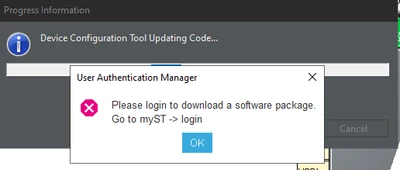
cmendi_0-1689698718278.png

When i try to login to my ST i get this error:
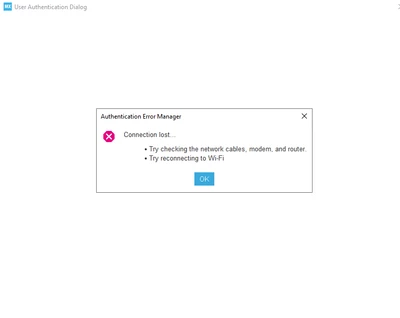
cmendi_1-1689698783053.png


I am on my work network, not sure if that matters. My internet is working fine with everything else but the STMCubeIDE

Thank you,


    Best answer by Peter BENSCH

    Welcome @cmendi, to the community!

    STM32CubeIDE uses the network settings under Window > Preferences > Network Connections. There you can choose between:

    • Direct (without proxy)
    • Manual (uses dedicated proxy settings)
    • Native (dynamic host)

    For Manual you have to enter your credentials if you are working over a VPN or a proxy. Please try if you can get it to work with one of these settings?

    Regards
    /Peter

    12 replies

    Visitor II
    June 8, 2025

    I solved the problem. Below is what I did, not sure which part works

    1. I logged into myST. My version 1.18.1, it's located at Help -> STM32Cube updates -> Connection to myST

    JWC_0-1749393765671.png

    2. I also followed instruction from ChatGPT below:

    In "Window -> Preference -> Available Software Sites", added 

    https://www.st.com/stm32cubeide/updates
    https://www.st.com/stm32cubeide/updates/stm32cubeide-repository

    JWC_2-1749394089231.png

    3. In Help -> STM32 Cube updates -> Embedded Software Package Manager, click 'Refresh' and found the packages I need. 

    JWC_1-1749393967262.png

    Hope it helps!

    Visitor II
    June 29, 2025

    reeeeeeeee_0-1751197803298.png

    I switched to "Use System Proxy Parameters" and solved this problem