
Associate II
October 3, 2023
Solved

nothing to build for project STM32446E_EVAL

  • October 3, 2023
  • 4 replies
  • 5735 views

I have used an example code of CAN loopback using nucleo STM32F446RE 
the location is 
C:\Users\.........Your User Name.....\STM32Cube\Repository\STM32Cube_FW_F4_V1.27.1\Projects\STM32446E_EVAL\Examples\CAN\CAN_Loopback


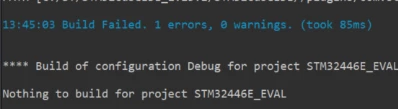
Unable to bulid this project and it is showing Nothing to build for project STM32446E_EVAL.

how can I solve this problem
    Best answer by Imen.D

    Hi @Komal,

    You are right, I reproduced the same issue related to Eclipse: "Nothing to build" error.

    ImenD_0-1696340272556.png

    An internal ticket ID 162938 is submitted to escalate this issue internally to the STM32CubeIDE team for working and fix it.

    (PS: ID 162938 is an internal tracking number and is not accessible or usable by customers).

    Thanks for your contribution and for having reported this.

    Imen

    4 replies

    Technical Moderator
    October 3, 2023

    Hello @Komal and welcome to the Community :)

    Which IDE version are you using? Can you please share the steps that you have followed?

    Try clean project and then re-open it again.

    To use STM32CubeIDE tool, please follow this UM2579: Migration guide from System Workbench to STM32CubeIDE.

    Imen

    "When your question is answered, please close this topic by clicking ""Accept as Solution"".ThanksImen"
    KomalAuthor
    Associate II
    October 3, 2023

    STM32CubeIDE_1.8.0 version

    had imported using following steps:
    1- Open STM32CubeIDE

    2-Click File-->open projects from file system or Archive

    3-Import project from the repository "\Repository\STM32Cube_FW_F4_V1.27.1\Projects\STM32446E_EVAL\Examples\CAN\CAN_Loopback\SW4STM32\STM32446E_EVAL"

    still it is showing as nothing to build, how can I solve the issue.

    Technical Moderator
    October 3, 2023

    I can open the project without issue using latest release of STM32CubeIDE and following these steps:

    - Start STM32CubeIDE

     -Go to File -> Import

    - in "Import" dialog, please select "Import ac6 System Workbench for STM32 Project".

    - Then Select the repository from "\Repository\STM32Cube_FW_F4_V1.27.1\Projects\STM32446E_EVAL\Examples\CAN\CAN_Loopback\SW4STM32\STM32446E_EVAL" folder in next dialog.

    - Press Finish (The project converter should start with some dialogs appear)

    - The project is imported in STM32CubeIDE.

    I hope this helps you.

    "When your question is answered, please close this topic by clicking ""Accept as Solution"".ThanksImen"
    KomalAuthor
    Associate II
    October 3, 2023

    opening/ importing a file is not an issue.

    the issue is that particular project is not compiling/building  

    TDK
    Super User
    October 3, 2023

    The issue is related to how the project was created or imported. If not done correctly, you will get this error. If you go through the Example Selector, or through the steps @Imen.D outlines above, the issue will likely resolve.

    "If you feel a post has answered your question, please click ""Accept as Solution""."
    Imen.DBest answer
    Technical Moderator
    October 3, 2023

    Hi @Komal,

    You are right, I reproduced the same issue related to Eclipse: "Nothing to build" error.

    ImenD_0-1696340272556.png

    An internal ticket ID 162938 is submitted to escalate this issue internally to the STM32CubeIDE team for working and fix it.

    (PS: ID 162938 is an internal tracking number and is not accessible or usable by customers).

    Thanks for your contribution and for having reported this.

    Imen

    "When your question is answered, please close this topic by clicking ""Accept as Solution"".ThanksImen"
    Visitor II
    September 30, 2024

    Could someone please provide details on whether the mentioned issue is resolved?

    I am facing the same issue and need some assistance in resolving the issue.

    Technical Moderator
    September 30, 2024

    Hi @nanna_hesaru and welcome to the Community

    Which STM32CubeIDE version are you using?

    "When your question is answered, please close this topic by clicking ""Accept as Solution"".ThanksImen"
    TDK
    Super User
    October 1, 2024

    The better solution here is to switch to STM32CubeIDE which is superior to SW4STM32 in every way.

    "If you feel a post has answered your question, please click ""Accept as Solution""."