PFlor.2
Senior II
September 13, 2024
Solved

Nucleo-H563ZI Project from Touch GFX will not show .ioc in STM32CubeIDE

  • September 13, 2024
  • 3 replies
  • 1410 views

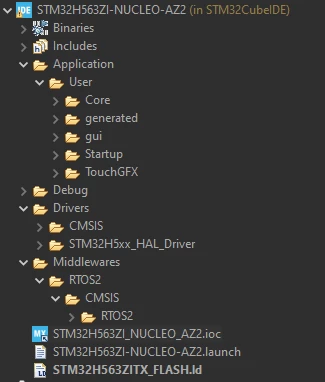
I created a project in TouchGFX Designer for the Nucleo-H563ZI dev kit as suggested by ST for projects that use TouchGFX.  Once created I imported the existing project into STM32CubeIDE which was fine, however the project explorer in STM32CubeIDE does not show the .ioc file even though it exists in the actual project files.

I tried to copy a link to the .ioc into the CubeIDE project explorer but when I try to open it the IDE says it's not part of the project, however I can open it in CubeMX and generate files just fine.  What am I missing?

 

PFlor2_0-1726236696291.png

PFlor2_1-1726236766007.png


    Best answer by Karl Yamashita

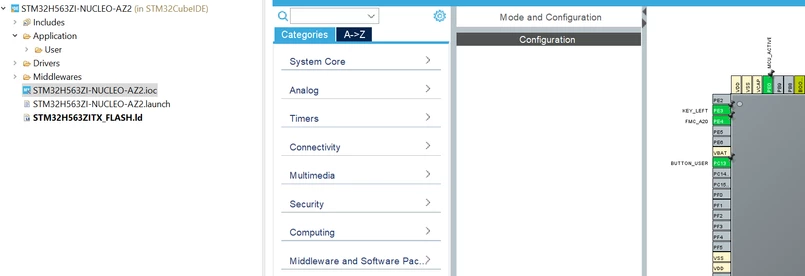
    It is a naming issue. Rename the IOC file by replacing the underscore with hyphens. Then you should be able to drag the file onto the project and link it.

    STM32H563ZI-NUCLEO-AZ2.ioc


    Here you can see the IOC file opened after it was renamed to match the project name.

    KarlYamashita_0-1726243195351.png


    3 replies

    mƎALLEm
    Technical Moderator
    September 13, 2024

    Hello,

    I reproduced the behavior, I will escalate it internally. I will get back to you for any feedback. (Internal ticket number 191086)

    But you can still use the independent STM32CubeMx tool to open your ioc file.


    "To give better visibility on the answered topics, please click on ""Accept as Solution"" on the reply which solved your issue or answered your question."
    Karl Yamashita
    Principal
    September 13, 2024

    It's probably a naming issue and some of the project files is looking for another name?

    It's been awhile so i don't know what has changed in TouchGFX but here is a video that shows how to rename the project to a useful name and adding the IOC file. 

    https://youtu.be/AizWAlbU4Og?si=n1cpCbG-Npb5Ivkt


    If a reply has proven helpful, click on Accept as Solution so that it'll show at top of the post.CAN Jammer an open source CAN bus hacking toolCANableV3 Open Source
    Karl Yamashita
    Karl YamashitaBest answer
    Principal
    September 13, 2024

    It is a naming issue. Rename the IOC file by replacing the underscore with hyphens. Then you should be able to drag the file onto the project and link it.

    STM32H563ZI-NUCLEO-AZ2.ioc


    Here you can see the IOC file opened after it was renamed to match the project name.

    KarlYamashita_0-1726243195351.png


    If a reply has proven helpful, click on Accept as Solution so that it'll show at top of the post.CAN Jammer an open source CAN bus hacking toolCANableV3 Open Source
    PFlor.2
    PFlor.2Author
    Senior II
    September 13, 2024

    That was it...hard to see that difference with underscore vs dash.  Thanks!

    Karl Yamashita
    Principal
    September 13, 2024

    I know exactly what you mean, lol.

    When i added the IOC to the project, which produced the warning, my brain was telling me something isn't right. I didn't see the issue. So i deleted the IOC file and added it again. Again my brain sensed the issue right away but it took my eyes about a minute to then see the difference. 

    If a reply has proven helpful, click on Accept as Solution so that it'll show at top of the post.CAN Jammer an open source CAN bus hacking toolCANableV3 Open Source