
NUCLEO-U575ZI-Q - Can't run any program using OpenOCD
I've been beating my head for a while trying to use OpenOCD to download my program to the chip, and I'm getting error messages which cite a write algorithm error (errors attached below). I'm not really too sure what I'm doing wrong, and would greatly appreciate any help and insight with resolving this!
TL;DR. I'm getting errors like
Error: flash write algorithm aborted by target
Error: error executing stm32l4 flash write algorithm
Error: flash write failed = 00000088
Error: block write failed
Error: error writing to flash at address 0x08000000 at offset 0x00000000
in the Console log from OpenOCD.
I've reproduced the error using OpenOCD with STM32CubeIDE as follows where I set up a fresh project, demonstrate that using ST-LINK (ST-LINK GDB SERVER) works, and finally demonstrate that using OpenOCD fails.
I create a new project with
File > New > STM32 Project
And go to "Board Selector", then select the "Commercial Part Number" to NUCLEO-U575ZI-Q.
I press "Next >", then fill out the following settings and press "Finish"
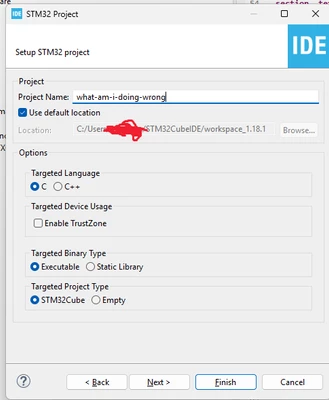
Not sure why the following menu popped up, but I filled it out as follows and pressed "Ok"
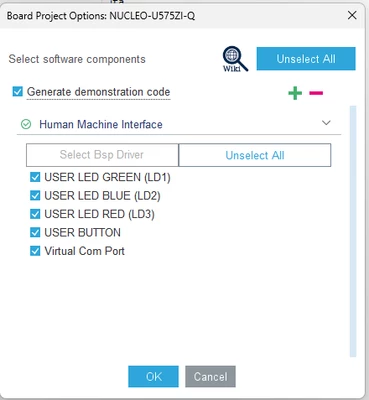
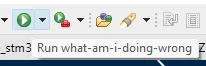
Then, when I switch to the project and press
And press "Ok" in the following menu
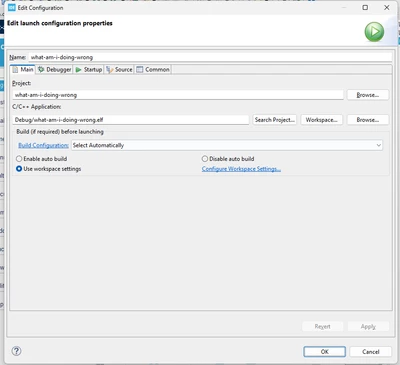
In the console logs,
STMicroelectronics ST-LINK GDB server. Version 7.11.0
Copyright (c) 2025, STMicroelectronics. All rights reserved.

Starting server with the following options:
 Persistent Mode : Disabled
 Logging Level : 1
 Listen Port Number : 61234
 Status Refresh Delay : 15s
 Verbose Mode : Disabled
 SWD Debug : Enabled
 InitWhile : Enabled

Waiting for debugger connection...
Debugger connected
Waiting for debugger connection...
Debugger connected
Waiting for debugger connection...
 -------------------------------------------------------------------
 STM32CubeProgrammer v2.20.0
 -------------------------------------------------------------------


Log output file: C:\Users\me\AppData\Local\Temp\STM32CubeProgrammer_a03444.log
ST-LINK SN : 0037003F3234511133353533
ST-LINK FW : V3J16M7
Board : NUCLEO-U575ZI-Q
Voltage : 3.30V
SWD freq : 8000 KHz
Connect mode: Under Reset
Reset mode : Hardware reset
Device ID : 0x482
Revision ID : Rev W
Device name : STM32U575/STM32U585
Flash size : 2 MBytes
Device type : MCU
Device CPU : Cortex-M33
BL Version : 0x93
Debug in Low Power mode enabled

 -------------------------------------------------------------------
 Choose flashing speed for Cortex M33 series.(default speed=Reliable)
 -------------------------------------------------------------------


Opening and parsing file: ST-LINK_GDB_server_a03444.srec


Memory Programming ...
 File : ST-LINK_GDB_server_a03444.srec
 Size : 27.47 KB
 Address : 0x08000000


Erasing memory corresponding to segment 0:
Erasing internal memory sectors [0 3]
Download in Progress:


File download complete
Time elapsed during download operation: 00:00:00.362


Verifying...


Time elapsed during verifying operation: 00:00:00.085


Download verified successfully


Shutting down...
Exit.
It looks like it downloads the application successfully.
However, if I go to
Run>Debug Configurations...
Then, click the "Debugger" and change the "Debug probe" to "ST-LINK (OpenOCD)" as follows
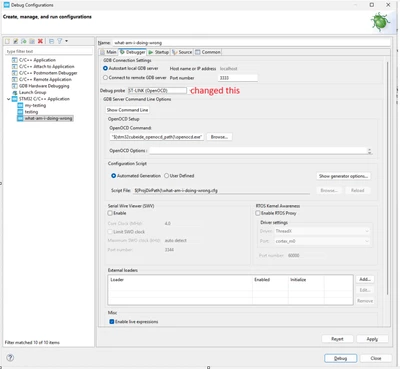
and press "Apply" then "Close"; and finally press
I get the following error menu
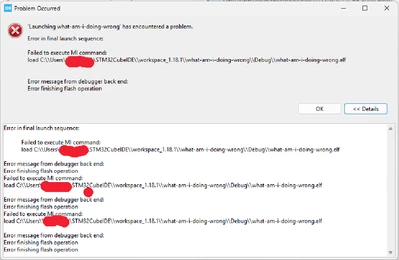
And the "Console" shows
Open On-Chip Debugger 0.12.0+dev-00623-g0ba753ca7 (2025-04-30-14:17) [https://github.com/STMicroelectronics/OpenOCD]
Licensed under GNU GPL v2
For bug reports, read
	http://openocd.org/doc/doxygen/bugs.html
clock_config
Info : Listening on port 6666 for tcl connections
Info : Listening on port 4444 for telnet connections
Info : STLINK V3J16M7 (API v3) VID:PID 0483:374E
Info : Target voltage: 3.299801
Info : clock speed 8000 kHz
Info : stlink_dap_op_connect(connect)
Info : SWD DPIDR 0x0be12477
Info : [STM32U575ZITxQ.ap0] Examination succeed
Info : [STM32U575ZITxQ.cpu] Cortex-M33 r0p4 processor detected
Info : [STM32U575ZITxQ.cpu] target has 8 breakpoints, 4 watchpoints
Info : [STM32U575ZITxQ.cpu] Examination succeed
Info : gdb port disabled
Info : starting gdb server for STM32U575ZITxQ.cpu on 3333
Info : Listening on port 3333 for gdb connections
Info : [STM32U575ZITxQ.cpu] external reset detected
Info : accepting 'gdb' connection on tcp/3333
CPU in Non-Secure state
[STM32U575ZITxQ.cpu] halted due to breakpoint, current mode: Thread
xPSR: 0xf9000000 pc: 0x08000b90 msp: 0x200c0000
STM32U575ZITxQ.cpu TrustZone disabled
STM32U575ZITxQ.cpu work-area address is set to 0x20000000
Info : device idcode = 0x30016482 (STM32U57/U58xx - Rev 'unknown' : 0x3001)
Info : TZEN = 0 : TrustZone disabled by option bytes
Info : RDP level 0 (0xAA)
Info : flash size = 2048 KiB
Info : flash mode : dual-bank
Info : device idcode = 0x30016482 (STM32U57/U58xx - Rev 'unknown' : 0x3001)
Info : TZEN = 0 : TrustZone disabled by option bytes
Info : RDP level 0 (0xAA)
Info : flash size = 2048 KiB
Info : flash mode : dual-bank
Info : device idcode = 0x30016482 (STM32U57/U58xx - Rev 'unknown' : 0x3001)
Info : TZEN = 0 : TrustZone disabled by option bytes
Info : RDP level 0 (0xAA)
Info : OTP size is 512 bytes, base address is 0x0bfa0000
Info : New GDB Connection: 1, Target STM32U575ZITxQ.cpu, state: halted
Info : accepting 'gdb' connection on tcp/3333
Info : New GDB Connection: 2, Target STM32U575ZITxQ.cpu, state: halted
[STM32U575ZITxQ.cpu] halted due to breakpoint, current mode: Thread
xPSR: 0xf9000000 pc: 0x08000b90 msp: 0x200c0000
Info : Padding image section 0 at 0x08006d4b with 1 bytes
Error: flash write algorithm aborted by target
Error: error executing stm32l4 flash write algorithm
Error: flash write failed = 00000088
Error: block write failed
Error: error writing to flash at address 0x08000000 at offset 0x00000000
[STM32U575ZITxQ.cpu] halted due to breakpoint, current mode: Thread
xPSR: 0xf9000000 pc: 0x08000b90 msp: 0x200c0000
Info : dropped 'gdb' connection
shutdown command invoked
Info : dropped 'gdb' connection
So, it looks like using the Debug probe as ST-LINK (ST-LINK GDB SERVER) works (I believe this shows my hardware connection is fine), but using ST-LINK (OpenOCD) doesn't work.
I'm running STM32CubeIDE version 1.19.0 ( Help > About STM32CubeIDE)
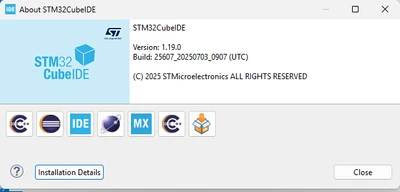
And if it's of any help, it looks like the OpenOCD command STM32CubeIDE is running is
C:\ST\STM32CubeIDE_1.18.1\STM32CubeIDE\plugins\com.st.stm32cube.ide.mcu.externaltools.openocd.win32_2.4.200.202505051030\tools\bin\openocd.exe "-f" "what-am-i-doing-wrong.cfg" "-s" "C:/Users/me/STM32CubeIDE/workspace_1.18.1/what-am-i-doing-wrong" "-s" "C:/ST/STM32CubeIDE_1.18.1/STM32CubeIDE/plugins/com.st.stm32cube.ide.mcu.debug.openocd_2.3.100.202501240831/resources/openocd/st_scripts" "-s" "C:/ST/STM32CubeIDE_1.18.1/STM32CubeIDE/plugins/com.st.stm32cube.ide.mpu.debug.openocd_2.2.1.202505211639/resources/openocd/st_scripts" "-c" "gdb_report_data_abort enable" "-c" "gdb_port 3333" "-c" "tcl_port 6666" "-c" "telnet_port 4444"
What am I missing / what am I doing wrong?
Thanks in advance for all the help :).