
Andrew Neil
Super User
June 6, 2024
Solved

Partial or Full chip erase before programming?

  • June 6, 2024
  • 4 replies
  • 8252 views

Keil (among others) allows the choice of whether to do a full or partial erase before programming:
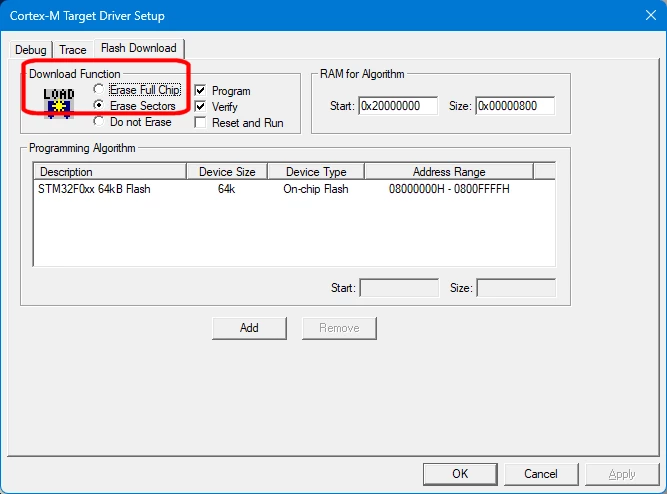
AndrewNeil_0-1717712173910.png

Is it possible to do that in STM32CubeIDE ?

If so, how ?

 

    Best answer by MM..1

    IDE work this way erase only code linker parts. I use this daily

    4 replies

    Senior III
    June 7, 2024

    Hi @Andrew Neil 

    I don't think there is a nice GUI window as in Keil, I'm using the external tool configuration and depending on the argument you specify it can do either mass erase or only needed sectors:

    Kraal_0-1717742885920.png

    For the sectors needed only, the argument is:
    -c port=SWD mode=UR -d ${workspace_loc}\${project_name}\${config_name:${project_name}}\${project_name}.elf -v -rst

    For mass erase instead:
    -c port=SWD mode=UR -e all -d ${workspace_loc}\${project_name}\${config_name:${project_name}}\${project_name}.elf -v -rst

    You can even skip the flash erase, or only some sectors. Everything is explained in the STM32_Programmer_CLI help.

    Have a nice day,
    Kraal

    Andrew Neil
    Super User
    June 7, 2024

    Thanks for that.

    So is that all I need to do, or does it also need some reference to the "external tool" to be added/modified elsewhere?

    A complex system that works is invariably found to have evolved from a simple system that worked.A complex system designed from scratch never works and cannot be patched up to make it work.
    Senior III
    June 7, 2024

    From the external tool configuration, the last tab "Common" there is a checkbox under "Display in favorites menu" that you should check (red box below) :

    Kraal_0-1717760371841.png

    Your configurations will then show in the main menu in the IDE :

    Kraal_1-1717760429806.png

    Note that you don't need to develop the drop down menu if you always use the same configuration, you can directly click on "Play_toolbox" icon (if you hover over it, the text shall say "use latest tool" or something like so).

    Warning: in my case, I have to select the project I want to flash in the project pane for the tool to work OK. Otherwise it fails to convert ${workspace_loc}\${project_name}\${config_name:${project_name}}\${project_name}.elf into something meaningful and will comply.

    Semer CHERNI
    ST Employee
    July 4, 2024

    Hello @Andrew Neil 

    First let me thank you for posting.

    This option is not available at this stage using STM32CubeIDE. However, plan to integrate similar feature in the tool.

    (113782: this is an internal ticket number).

    KR,
    Semer.

    Andrew Neil
    Super User
    July 4, 2024

    You mean the "Launch Group" mentioned by @Kraal ?

    Is it this:

    AndrewNeil_0-1720099149094.png


    A complex system that works is invariably found to have evolved from a simple system that worked.A complex system designed from scratch never works and cannot be patched up to make it work.
    BarryWhit
    Lead
    July 5, 2024

    If your requirements are to specifically do this through existing options provided by the IDE - I can't help.

    But CubeProgrammerCLT does give you fine control about what to erase and what to write:

    CMD> STM32_Programmer_CLI.exe
    Available commands for STM32 MCU:
    
     -e, --erase : Erase memory pages/sectors devices: 
     Not supported for STM32MP
     [all] : Erase all sectors
     [<sectorsCodes>] : Erase the specified sectors identified by sectors
     codes. ex: 0, 1, 2 to erase sectors 0, 1 and 2
     for EEPROM : ed1 & ed2 
     [<[start end]>] : Erase the specified sectors starting from
     start code to end code, ex: -e [5 10]
     -w, --write 
     -d, --download : Download the content of a file into device memory
     <file_path> : File path name to be downloaded: (bin, hex, srec, s19
     elf, stm32 or tsv file)
     [<address>] : Start address of download
     -w64 : Write a 64-bits data into device memory
     <address> : Start address of download
     <64-bit_data> : 64-bit data to be downloaded
     values should not be separated by space
     -w32 : Write a 32-bits data into device memory
     <address> : Start address of download
     <32-bit_data> : 32-bit data to be downloaded
     values should be separated by space

    So with some tinkering, you could probably get what you want by that route.


    Alternatively, the open-source flashrom project supports stlinkv3, so you could also hack a custom command into that.


    Once you have a script/program that does what you want, you should be able to plug that into your IDE flow so that programming is done using that tool. Worst case, jerryrig a file-watcher util to launch your download script whenever it detects a change in the compiled binary, and tell your IDE not to download when you start a debug session.

    Pavel A.
    Super User
    July 5, 2024

    So the tools would have no knowledge that the space was being used for anything?

    At least the GNU tools have no idea. IAR toolchain seems to be smarter in interop between compiler and linker. (But I don't use it recently, as the customers migrate to "free cheese").