
Associate
December 10, 2025
Solved

Print in SWV on a 32L476GDISCOVERY

  • December 10, 2025
  • 4 replies
  • 510 views

Hello everyone!


My problem is supposed to be a very simple one. I use an interrupt to send messages to my PC, then I send a message back to my STM32. The message is received in good order but I can't print it out. I watched every single YouTube video out there, implemented every single solution (including connecting the SWO to the PB3 pin) - nothing works so far.

Can anyone tell me where am I mistaken?


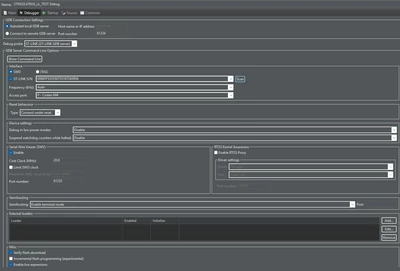
My Debug Configuration:
nick_iliev_0-1765366595464.png

Main.c, main.h, and syscalls.c are attached
Best answer by KDJEM.1

Hello @nick_iliev ;


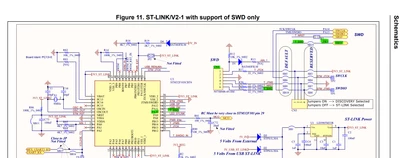
According the UM1879, to connect T_SWO pin in CN4 to PB3(SWO) pin you need to solder SB14.

KDJEM1_0-1765528055183.png


Thank you.

Kaouthar


4 replies

KDJEM.1
Technical Moderator
December 11, 2025

Hello @nick_iliev and welcome to the community;


Are you able the see the message when using a terminal such as TeraTerm?

Could you please check the status of SB14 solder bridge.

KDJEM1_0-1765467288835.png

Thank you.

Kaouthar

To give better visibility on the answered topics, please click on Accept as Solution on the reply which solved your issue or answered your question.
Associate
December 12, 2025

Hello Kaouthar,


I use DockLight and I do get confirmation for a received message. I can also see the message in my Rx buffer during debugging via the variable explorer.


Thanks for the reply! Yes, the bridge seems to be unsoldered. Perhaps I have to solder it?


Best wishes,

Nick

KDJEM.1
KDJEM.1Best answer
Technical Moderator
December 12, 2025

Hello @nick_iliev ;


According the UM1879, to connect T_SWO pin in CN4 to PB3(SWO) pin you need to solder SB14.

KDJEM1_0-1765528055183.png


Thank you.

Kaouthar


To give better visibility on the answered topics, please click on Accept as Solution on the reply which solved your issue or answered your question.
Associate
December 16, 2025

Hello Kaouthar,


Yes, this appeared to be the problem. Thank you!


Best wishes,

Nick

KDJEM.1
Technical Moderator
December 16, 2025

Hello @nick_iliev ;


If the problem is resolved, please click on Accept as Solution on the reply which solved your issue.


Thank you

Kaouthar

To give better visibility on the answered topics, please click on Accept as Solution on the reply which solved your issue or answered your question.