Senior
August 29, 2024
Solved

Project (or similar) remains in project tree despite closing the project?

  • August 29, 2024
  • 1 reply
  • 1079 views

Hi,

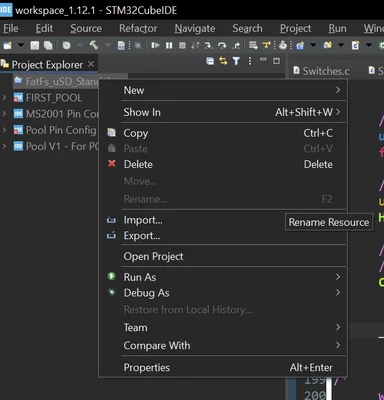
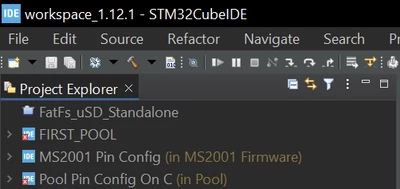
I opened one of the examples projects and then closed it. But no matter what I tried (including closing all files and restarting CubeIDE) the FatFS_uSD_Standalone project (or something else?) remains present in the project explorer as if it is some other project. See screenshots below. And there are no options if I right click on it.


The icon is also different and cannot find anywhere a summary of CubeIDE icons.

What is that file/project or what does that icon mean? And how do I remove it?

Thank you
Ricko_0-1724892021158.png


Ricko_1-1724892216363.png


Best answer by christelle burguera

Hello Ricko,

it's like that because you have only closed the project, if you want to remove from your workspace you have to remove it.

For that, select the project you want to remove, click on the "Suppr" button on your keyboard or select the Delete menu and take care not to delete the project from your disk (DO NOT ENABLE "Delete project contents on disk").

the closed project feature is useful if you want to reopen your project later...


HTH

1 reply

christelle burguera
ST Employee
August 29, 2024

Hello Ricko,

it's like that because you have only closed the project, if you want to remove from your workspace you have to remove it.

For that, select the project you want to remove, click on the "Suppr" button on your keyboard or select the Delete menu and take care not to delete the project from your disk (DO NOT ENABLE "Delete project contents on disk").

the closed project feature is useful if you want to reopen your project later...


HTH

RickoAuthor
Senior
August 29, 2024

Thank you @christelle burguera :)