
Associate II
September 17, 2024
Solved

Question for .ioc File View

  • September 17, 2024
  • 3 replies
  • 1475 views

Hello,

Currently I am working with a view like this: 
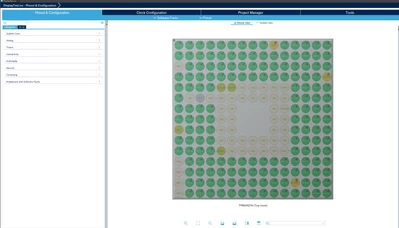
jindo85547_0-1726609190597.png

and I was wondering if there was any way for me to change the view into something like this:
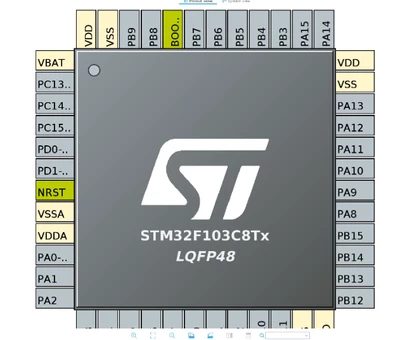
jindo85547_1-1726609223271.png

or is the view something that is varies based on the different chips?

I don't know why but the view that I am working with is very irritating to me, so if possible I would prefer to work with something that looks like the second picture.
    Best answer by mƎALLEm

    Hello @jindo85547 and welcome to the community,

    That depends on the package you would use for your application.

    The first one is BGA and the second one is LQFP. 

    You can't change the package based on an already configured project. You need to start from scratch based on the MCU part number.

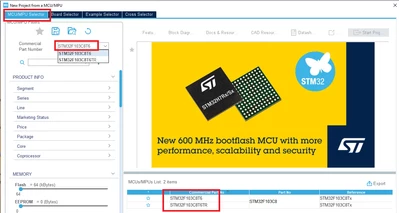
    To have the second package, you need to type the part number in Commercial part number field and select that part number then double click on the part number shown in the table at bottom right of the window.

    SofLit_0-1726610684491.png

    Hope I answered your question.


    3 replies

    mƎALLEm
    mƎALLEmBest answer
    Technical Moderator
    September 17, 2024

    Hello @jindo85547 and welcome to the community,

    That depends on the package you would use for your application.

    The first one is BGA and the second one is LQFP. 

    You can't change the package based on an already configured project. You need to start from scratch based on the MCU part number.

    To have the second package, you need to type the part number in Commercial part number field and select that part number then double click on the part number shown in the table at bottom right of the window.

    SofLit_0-1726610684491.png

    Hope I answered your question.


    "To give better visibility on the answered topics, please click on ""Accept as Solution"" on the reply which solved your issue or answered your question."
    Andrew Neil
    Super User
    September 17, 2024

    As @mƎALLEm said, the view you get is a view of the chip package you have selected.

    So the only way to change the view is to change the package.

    The chip datasheet will tell you what package options are available; the "Ordering information scheme" at the end of the datasheet shows you how the package type is encoded into the part number:

    AndrewNeil_0-1726611893218.png


    Hence you can see that an STM32F103C8T has an LQFP package with 48 pins

    A complex system that works is invariably found to have evolved from a simple system that worked.A complex system designed from scratch never works and cannot be patched up to make it work.
    Associate II
    September 18, 2024

    Thank you to everyone who responded! It looks like the STMF746 Discovery Board that I am using has that one package, so I supposed I will just push through with it. This was a great learning experience, and I am thankful to everyone who responded and elaborated!