
Associate II
July 29, 2025
Solved

"Range [0,-1) out of bounds for length 48" trying to open Debug Configuration

  • July 29, 2025
  • 5 replies
  • 1249 views

Hello, I'm trying to set the debug configuration of my project, but I cannot open the debug file under C/C++ Application. Besides, running this project was not successful either.
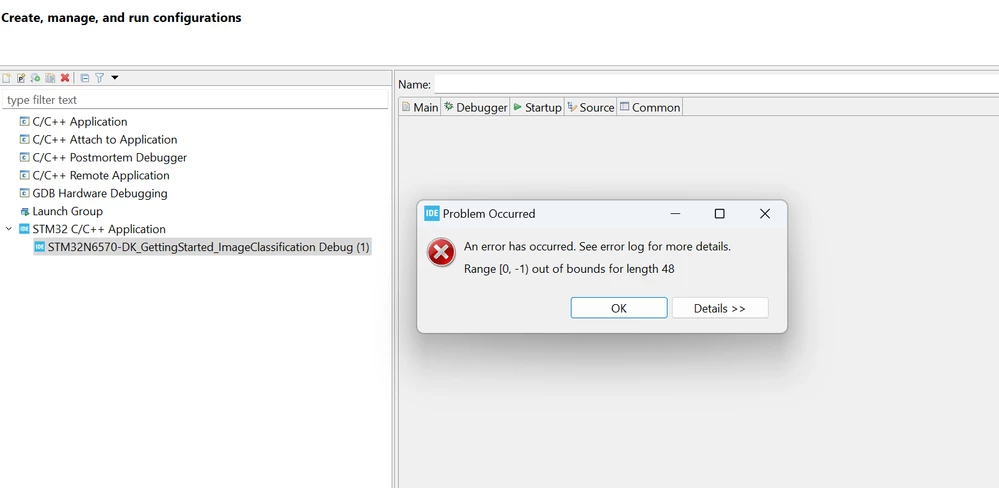
Levyhy_0-1753770582011.png

I have tried switching workspace and uninstalling IDE, but neither worked.

Can anyone help me solve my problem? Thank you very much.

Best answer by Imen.D

Hello @Levy-hy ,

We have reproduced this issue with CubeIDE 1.19 and I escalated it to our CubeIDE team for analysis (internal ticket number: 215198).

PS: Ticket number: 215198 is an internal tracking number and is not accessible or usable by customers.

5 replies

mbarg.1
Senior III
July 29, 2025

Version of STM32CubeIde?

Version 1.18 are buggy - update to 1.19

Levy-hyAuthor
Associate II
July 29, 2025

Mine is 1.19, already the latest one

Andrew Neil
Super User
July 29, 2025

Did you try pressing the 'Details' button?

The message says, "Out of bounds for length 48".

The name of your Debug Configuration is very long* - maybe it's too long?

Maybe try just shortening the name?


PS

* The name certainly is over 48 characters!

A complex system that works is invariably found to have evolved from a simple system that worked.A complex system designed from scratch never works and cannot be patched up to make it work.
Levy-hyAuthor
Associate II
July 29, 2025

Levyhy_0-1753777014899.png

Details are the same. I tired to rename the project to make its name shorter, but it didn't work either.

Then I opened another project, and found its run configuration back to normal. So I assume the problem lies in the project. But the project is the example AI demo project of STM32N6 and I'm stuck here:( 


Technical Moderator
July 29, 2025

@Levy-hy , Did you make any changes to the Demo project? 

Check Project configuration, such as memory allocation and linker scripts are correctly configured.

You can also, perform a clean build of the project to ensure no corrupted files are causing this issue.

"When your question is answered, please close this topic by clicking ""Accept as Solution"".ThanksImen"
Technical Moderator
July 29, 2025

Hello @mbarg.1 

Try follow the steps in this article : How to debug STM32N6 using STM32CubeIDE

"When your question is answered, please close this topic by clicking ""Accept as Solution"".ThanksImen"
Imen.DBest answer
Technical Moderator
August 1, 2025

Hello @Levy-hy ,

We have reproduced this issue with CubeIDE 1.19 and I escalated it to our CubeIDE team for analysis (internal ticket number: 215198).

PS: Ticket number: 215198 is an internal tracking number and is not accessible or usable by customers.

"When your question is answered, please close this topic by clicking ""Accept as Solution"".ThanksImen"
Associate II
August 8, 2025

Hello Imen.D,

I am also facing the same issue . Is there a resolution to the issue available?

Ghofrane GSOURI
Technical Moderator
August 19, 2025

Hello @Levy-hy 

As a workaround, try removing the following line from your .project file:

<nature>com.st.stm32cube.ide.mcu.MCUAppSProjectNature</nature>


GhofraneGSOURI_0-1755603295833.png

You will be able to debug your project successfully.

GhofraneGSOURI_1-1755603379550.png

THX

Ghofrane

To give better visibility on the answered topics, please click on Accept as Solution on the reply which solved your issue or answered your question.