EThom.3
Senior II
December 16, 2025
Solved

Refactor -> Rename renames indentifiers in all my projects

  • December 16, 2025
  • 5 replies
  • 1066 views

Background: I have designed a new PCB, which includes a chip similar to one I've used on other PCBs, but with a different part number. The function names for this chip start with the part number.

As mentioned, the new project uses a slightly different chip, with a different part number. To not start from scratch, I copied the chip-related files from a different project in the same workspace, and changed the function names. I used Refactor -> Rename to rename the functions, so it would do the source and header files in one go.

But renaming didn't stop with the new project. It renamed identical function names in the older projects as well. All files where these functions were mentioned, were updated and saved. So now I have a file restoring task ahead of me. Thank Goodness for a cloud service with a file version history.

Question:

How do I avoid this in the future? I would very much like to limit renaming to a single project. But the only setting I have found regarding this is here:
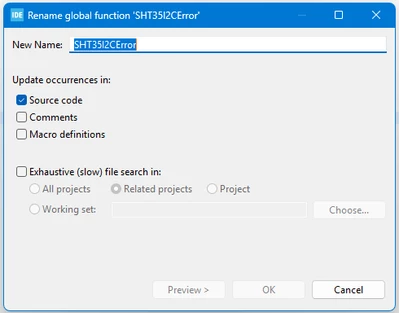
EThom3_0-1765881474731.png

This is how it was set up when I did the renaming. Or so I believe – I didn't actually open the window until I had discovered the accident.

My guess is that I should have set it up like this (below) but can anyone confirm it? Or are there some other settings that I simply haven't found?
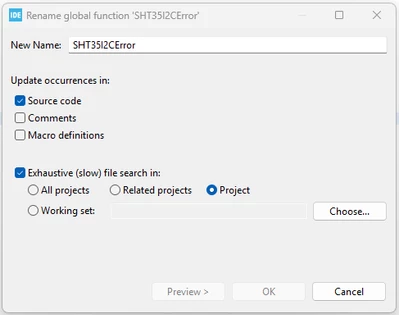
EThom3_2-1765881730748.png

Any help will be appreciated.

Best answer by Andrew Neil

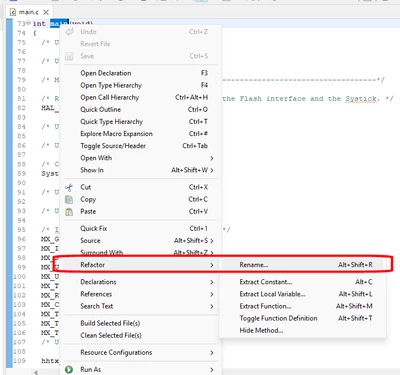
I've only ever used the 'Refactor' feature from the right-click menu, and don't seem to have had this problem.

Perhaps you could try that instead ... ?

AndrewNeil_0-1765887587276.png


5 replies

Lead II
December 16, 2025
  1. Were all the other projects open? I recommend closing projects you are not working with.
  2. Have you considered using git?
"Kudo posts if you have the same problem and kudo replies if the solution works.Click ""Accept as Solution"" if a reply solved your problem. If no solution was posted please answer with your own."
EThom.3
EThom.3Author
Senior II
December 16, 2025

1. Yes.

Several of these projects are related. Some firmwares communicate with each other in the products where they are used, thus I frequently work on two or more projects simultaneously.

2. In my former workplace, git was used. And I learned to utterly dislike it.

Andrew Neil
Super User
December 16, 2025

@EThom.3 wrote:

git was used. And I learned to utterly dislike it.


Other version control systems are available ...

A complex system that works is invariably found to have evolved from a simple system that worked.A complex system designed from scratch never works and cannot be patched up to make it work.
EThom.3
EThom.3Author
Senior II
December 16, 2025

Hi Andrew,

Indeed. (And I use my own.)

Files have been restored without issues.

LCE
Principal II
December 16, 2025

"Nightmare before christmas"

;)

Happy for you that you could restore the files!

Backups and versioning systems are there for a reason...

EThom.3
EThom.3Author
Senior II
December 16, 2025

True. :D

Restoring the files was no big deal. Just a slight annoyance.


Returning to my original question: If I can trust the Preview feature, it seems that Refactor -> Rename attempts to rename in all open projects, regardless of the settings in the Preview window. I do have the possibility to uncheck certain files, but only if I remenber to use Preview.

So... maybe I should just stop using Refactor -> Rename. Although it was rather practical.

Andrew Neil
Andrew NeilBest answer
Super User
December 16, 2025

I've only ever used the 'Refactor' feature from the right-click menu, and don't seem to have had this problem.

Perhaps you could try that instead ... ?

AndrewNeil_0-1765887587276.png


A complex system that works is invariably found to have evolved from a simple system that worked.A complex system designed from scratch never works and cannot be patched up to make it work.
EThom.3
EThom.3Author
Senior II
December 16, 2025

Errr... I'm not sure why a reply has been marked as a solution, as nothing has actually been solved.

I still believe that the feature does stuff it shouldn't do.

Lead II
December 16, 2025

@EThom.3 wrote:

Errr... I'm not sure why a reply has been marked as a solution, as nothing has actually been solved.

I still believe that the feature does stuff it shouldn't do.


Perhaps you clicked on a wrong button? Generally only the topic starter can accept the solution. Unless a moderator intervenes. You can unmark it as a solution.

"Kudo posts if you have the same problem and kudo replies if the solution works.Click ""Accept as Solution"" if a reply solved your problem. If no solution was posted please answer with your own."
Andrew Neil
Super User
December 16, 2025

@unsigned_char_array wrote:

You can unmark it as a solution.

Indeed.

@EThom.3 - instructions here. Still works if the "solution" was marked by a moderator.

A complex system that works is invariably found to have evolved from a simple system that worked.A complex system designed from scratch never works and cannot be patched up to make it work.
EThom.3
EThom.3Author
Senior II
December 17, 2025

Hi guys (and, if possible, gals)

I have just had a look in the STMCubeIDE manual, as opposed to just the built-in help function. And I found this:

EThom3_0-1765954870698.png

So, as it turns out, this isn't actually an error. But, in my opinion, a somewhat impractical (and sometimes dangerous) functionality.

I apologise for the inconvenience. Have a great day.