
Associate
September 29, 2025
Solved

Remote Debugging with ST Link V3 Set

  • September 29, 2025
  • 2 replies
  • 450 views

Hello, I have an stm processor (stm32h7b3zitx) connected to an ST Link V3 that is on an ubuntu server. My goal is to connect to the ST Link and run a remote debugging session from my windows laptop running the stm32CubeIDE. To accomplish this I have been running st-util -v -p 61234 on the ubuntu server and using the following debugging configuration in the cube ide.
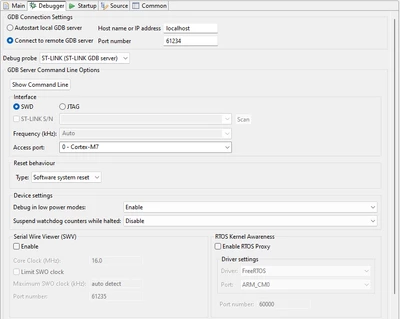
stmAdmin_0-1759156573498.png

I am port forwarding via an ssh connection to expose port 61234 on my windows machine. When I go to debug, I get the following error

stmAdmin_1-1759156711391.png

I've attached the verbose gdb log from host machine and the verbose st-util log from the ubuntu server to this post. I'm wondering what steps I can take to resolve this. Thanks in advanced to all who view this!

Best answer by MM..1

Im not ubuntu expert, but on windows i use com.st.stm32cube.ide.mcu.externaltools.stlink-gdb-server.win32_1.6.0.202101291314 for remote dubuging with used big complicated config.txt. Plus firewall open.

2 replies

Technical Moderator
September 29, 2025

Hello @stmAdmin  

 Is it detected with STM32CubeProgrammer?  

Try connecting with STM32CubeProgrammer. Try mass erase, full chip erase, then try flashing.

"When your question is answered, please close this topic by clicking ""Accept as Solution"".ThanksImen"
stmAdminAuthor
Associate
September 29, 2025

Hi @Imen.D ,

The device is detected by stm32CubeProgrammer, here is the output from running STM32_Programmer_CLI -c port=SWD.

-------------------------------------------------------------------
STM32CubeProgrammer v2.20.0
-------------------------------------------------------------------

ST-LINK SN : 003E00293234510537333934
ST-LINK FW : V3J16M9B5S1
Board : STLINK-V3SET
Voltage : 3.26V
SWD freq : 8000 KHz
Connect mode: Normal
Reset mode : Software reset
Device ID : 0x480
Revision ID : Rev X
Device name : STM32H7A/B
Flash size : 2 MBytes
Device type : MCU
Device CPU : Cortex-M7
BL Version : 0x92

MM..1
MM..1Best answer
Chief III
September 29, 2025

Im not ubuntu expert, but on windows i use com.st.stm32cube.ide.mcu.externaltools.stlink-gdb-server.win32_1.6.0.202101291314 for remote dubuging with used big complicated config.txt. Plus firewall open.

stmAdminAuthor
Associate
September 29, 2025

Thanks @MM..1 !! Using the linux equivalent (/opt/st/stm32cubeide_1.19.0/plugins/com.st.stm32cube.ide.mcu.externaltools.stlink-gdb-server.linux64_2.2.200.202505060755/tools/bin) I am able to connect and debug!! I had tried this before, but without using the info from config.txt, I needed to add the -d flag to connect in SWD mode so thank you for mentioning the config. @Imen.D I'd still like to know why this doesn't work with st-util since it's advertised as being capable of this functionality, but I'm going to mark this one as solved!