
Associate II
January 14, 2025
Question

Serial Wire Viewer on STM32H7S3L8

  • January 14, 2025
  • 7 replies
  • 1254 views

Has anyone worked with the Serial Wire Viewer on an STM32H7RS board?

We've been using it on a F7 board, without too much issue, but we are stuck on this new board. 
We've followed the usual steps :

- Enable Serial Wire Viewer (SWV) in Debug configuration (using the CPU Core Clock)
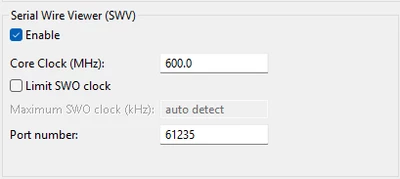
PhilMaz_0-1736843286859.png

- Overwrite the "_write" function to use ITM_SendChar(...) (also tested that it works and calls it for every character we send with printf()

- Open the SWV ITM Data Console, enabling port 0 and start trace. 

However, nothing appears in the console :( 

We double checked the clock ..
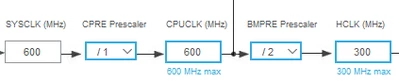
PhilMaz_1-1736843475216.png

We also tried to enable the debug mode for our application (although, it doesn't seem to change anything in the code)
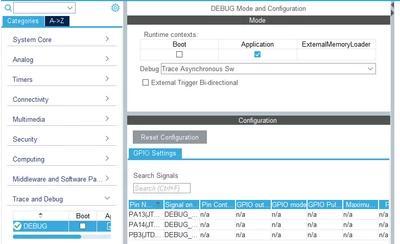
PhilMaz_2-1736843517043.png


But so far nothing..
One thing to note is that our application uses ThreadX and NetXDuo (I don't know if it has an impact...)
We are also using a simple STLINK-V3 connector to debug

7 replies

Associate III
May 16, 2025

hello same issue on the H7S7 DK board

@KDJEM.1 Could you check if there is a bug in the chip for SWO ?

Using the HCLK or CPU Mhz

Thanks

Associate II
September 30, 2025

We see the same issue using NUCLEO-H7S3L8

Associate II
October 6, 2025

We have faced the same issue using NUCLEO-H753ZI

Pavel A.
Super User
October 1, 2025

Please be sure to use a recent version of CubeIDE or CubeProg. IIRC, newer STM32H7 need extra divisor for the core frequency. Older tools are not aware of this (but you can tweak the core frequency in settings).


Associate II
October 1, 2025
Pavel A<>
I am using STM32CubeIDE Version 1.19.0
[cid:f7b26411-0ca5-401c-aa64-aea0bfa68269]

[cid:f25e84a2-92d6-4c87-80ac-d9fe18753dae]
[cid:acca706a-2289-47a0-a749-1632afa7f2d6]
Can you clarify “newer STM32H7 need extra divisor for the core frequency”
Thanks Daniel
Associate II
October 1, 2025

Daniel_Marosi_0-1759332174416.png

Daniel_Marosi_1-1759332186588.png

Daniel_Marosi_3-1759332216971.png


Pavel A.
Super User
October 1, 2025

Can you clarify “newer STM32H7 need extra divisor for the core frequency”

IIRC the newer 'H7 (H72x/73x) have additional divisor for core clock -> ITM that does not exist in older series (H743/753...).

Current versions of CubeIDE and CubeProgrammer detect these MCUs and automatically apply the divisor, so users do not need to change anything in the ITM setup - just put there the core clock as usual.


Associate
October 3, 2025

For my part, working on NUCLEO-H7S3L8 and using STM32CubeIDE Version: 1.16.1, I had to configure the SWV clock to a third of my core clock (configured at 600 Mhz):

Tahm_A_0-1759503010542.png

I wonder if it has anything to do with the Debug peripheral clock divider:

Tahm_A_1-1759503157742.png

Source

Associate II
October 3, 2025

Thank  you Tahm_A

Fix Serial Wire View issue by setting SWV core clock to 200Mhz and SYSCLOCK to 600Mhz


October 4, 2025

It sounds like the setup is mostly correct, but a few things can cause SWV to not output anything on H7 boards:

  1. Core clock mismatch – make sure the CPU core clock configured in the debug settings exactly matches the running core clock, including any PLL settings. Even small differences can prevent ITM output.

  2. Trace port clock – on H7, the trace system (ETM/ITM) may require enabling Trace Port Interface Unit (TPIU) and configuring the correct prescaler for SWO.

  3. ThreadX/NetXDuo impact – RTOS context switching itself doesn’t prevent SWV, but if your printf/ITM_SendChar calls happen in interrupts or threads very frequently, the ITM FIFO can overflow silently. Try sending very small, simple messages first.

  4. STLINK-V3 settings – ensure SWO is enabled in ST-Link utility or in your IDE, and select NRZ or UART protocol correctly depending on your SWO clock speed.

Start with a simple “Hello world” in main() without RTOS, verify SWV works, then integrate with ThreadX/NetXDuo. This usually isolates whether it’s a board/clock issue or RTOS interaction.

Pavel A.
Super User
October 4, 2025

Core clock mismatch – make sure the CPU core clock configured in the debug settings exactly matches the running core clock

Exactly. The value of SystemCoreClock global variable (standard CMSIS), divide it by 10**6 (Hz to MHz) and put the result into the GUI. But remember that the CPU starts off with some internal clock, so the ITM won't work until the program calls SystemClock_Config (or equivalent) to start the PLL and it stabilizes at the given frequency.

But the debugger starts the ITM much earlier, maybe at the first breakpoint at main, or so - and it starts streaming some data at a wrong frequency. This can confuse the debugger while it tries to parse the data. I guess this may be the reason why ITM is so flaky.


PHolt.1
Senior
October 4, 2025

Interesting point.

The CPU probably starts at 16MHz. That is the 32F4 speed.

The breakpoint on main() is configurable but you need a PhD in UI design to find where (it is under Project / Properties ... Debugger and one of the other tabs like Startup, IIRC).