yilmazkircicek
Associate III
April 4, 2025
Solved

Shaded codes in editor

  • April 4, 2025
  • 1 reply
  • 420 views

Hi All, 

1 - HAL_QSPI_MODULE_ENABLED is defined and the shaded code areas are combiled. But I could not find why these codes seems shaded, do you ?

2, 3 - I can see file icon on the top left corner of the stm32h7xx_hal_conf.h file name and context menu shows absoulte path when mouse over while other files path seems relative to project directory. Do you know why ?

Regards. 
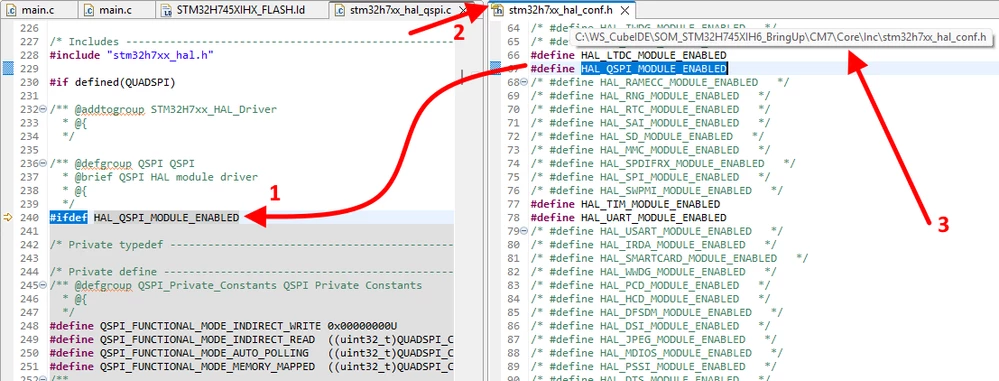
Shaded.png

Best answer by Andrew Neil

If you right-click on HAL_QSPI_MODULE_ENABLED (at line 240), and then Go To Definition (F3, or via Right-Click menu), does it take you to that definition in stm32h7xx_hal_conf.h ?

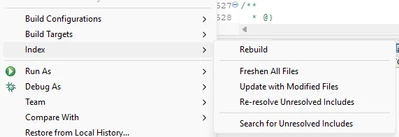
Have you tried rebuilding the Index ?

In the Project Context menu:

AndrewNeil_0-1743782819136.png


@yilmazkircicek wrote:

2, 3 - I can see file icon on the top left corner of the stm32h7xx_hal_conf.h file name and context menu shows absoulte path when mouse over while other files path seems relative to project directory.


Not sure what you mean by that.

Show an example where you think you're getting "relative" paths ?


PS:

The indexing/referencing/shading is standard Eclipse stuff - not specific to STM32:

https://mcuoneclipse.com/2012/03/20/fixing-the-eclipse-index/

1 reply

Andrew Neil
Andrew NeilBest answer
Super User
April 4, 2025

If you right-click on HAL_QSPI_MODULE_ENABLED (at line 240), and then Go To Definition (F3, or via Right-Click menu), does it take you to that definition in stm32h7xx_hal_conf.h ?

Have you tried rebuilding the Index ?

In the Project Context menu:

AndrewNeil_0-1743782819136.png


@yilmazkircicek wrote:

2, 3 - I can see file icon on the top left corner of the stm32h7xx_hal_conf.h file name and context menu shows absoulte path when mouse over while other files path seems relative to project directory.


Not sure what you mean by that.

Show an example where you think you're getting "relative" paths ?


PS:

The indexing/referencing/shading is standard Eclipse stuff - not specific to STM32:

https://mcuoneclipse.com/2012/03/20/fixing-the-eclipse-index/

A complex system that works is invariably found to have evolved from a simple system that worked.A complex system designed from scratch never works and cannot be patched up to make it work.
yilmazkircicek
Associate III
April 4, 2025

Hi Mr. Neil, 

Thanks for prompt response. Rebuilding index solve the shading problem. 

Prior to this operation, F3 was not working. 

Rebuild Index.png


Regarding file path and symbol;

There is a file icon top left of the stm32h7xx_hal_conf.h file name, I do not know why is it ?

Also, when the mouse cursor over the file name, a path is shown in IDE, as you can see. The files without file icon path is relative to project but full path for the files without icon. I have tried with different file types. I wonder why ?

Regards. 

Icon.png