
heke
Associate II
June 18, 2025
Question

[Solved] IAC columns are narrow on .ioc configuration view

  • June 18, 2025
  • 1 reply
  • 265 views

HI,

Just notifying this as a solution if someone else has the same problem.

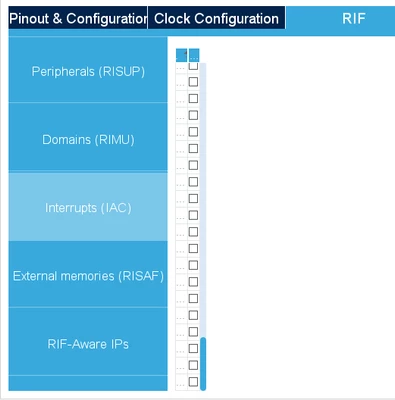
By no apparent reason, the columns of IAC page on .ioc configuration editor running on CubeIDE become uselessly narrow (see image below). Restart the IDE did not help. Other pages show normally. In CubeMX this does not happen.
heke_0-1750206186632.png

The solution is to move the separator bar between the project hierarchy panel and editor panel to left. Apparently the IAC page does not handle the width scaling correctly (other pages on that tab do that nicely).

Cheers, heke


1 reply

Semer CHERNI
ST Employee
June 23, 2025

Hello @heke 

First let me thank you for posting.

Could you please provide the STM32CubeIDE version used.
Could you to reset the perspectives : "Window > Perspective > Reset Perspective..." and if the issue still exist could you try creating a new workspace.

I made the test with STM32CubeIDE 1.18.1 and I am not able to see the same behavior.

KR,
Semer.

heke
hekeAuthor
Associate II
June 27, 2025

Hi Semer,

The CubeIDE version is 1.18.1.

Perspective reset did not help, neither did new workspace.

Here are some system details:

Microsoft Windows 10 Pro, Version 10.0.19045
Display ATI Radeon HD 4600 Series. Resolution 1280x800x59Hz
N6 firmware 1.1.0

I think this is due to my low resolution display. 

Anyway, as the configuration feature will be removed in CubeIDE 2.0, this may not be "critical".

Cheers, heke