
Associate III
March 19, 2025
Solved

ST link error: Failed to bind to port 61235; Failure starting SWV server

  • March 19, 2025
  • 5 replies
  • 3211 views

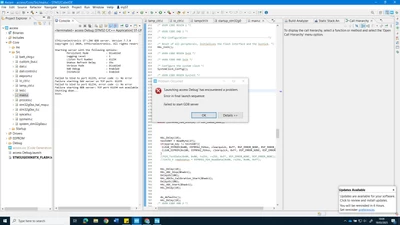
Hi I am experiencing an issue on my IDE I couldn't able to Run/Debug .However the ST Link can be communicated with the target in STM32 Cube programmer but not in STM32 cube IDE.
meena_0-1742378983077.png

Console  Error:

STMicroelectronics ST-LINK GDB server. Version 7.7.0

Copyright (c) 2024, STMicroelectronics. All rights reserved.


Starting server with the following options:

Persistent Mode : Disabled

Logging Level : 1

Listen Port Number : 61234

Status Refresh Delay : 15s

Verbose Mode : Disabled

SWD Debug : Enabled

InitWhile : Enabled


Failed to bind to port 61235, error code -1: No error

Failure starting SWV server on TCP port: 61235

Failed to bind to port 61234, error code -1: No error

Failure starting GDB server: TCP port 61234 not available.

Shutting down...

Exit.


Can someone Please help me


Best answer by Andrew Neil

@meena wrote:

Failed to bind to port 61235, error code -1: No error

Failure starting SWV server on TCP port: 61235


Suggest a "network" issue (even if everything is local to the same PC).

STM32CubeIDE does require some Windows Firewall exceptions - presumably for this kind of stuff.

So maybe something has messed with that...?

5 replies

Andrew Neil
Super User
March 19, 2025

Please post a legible screenshot.

A complex system that works is invariably found to have evolved from a simple system that worked.A complex system designed from scratch never works and cannot be patched up to make it work.
meenaAuthor
Associate III
March 19, 2025


meena_2-1742380627692.png

I am using STM32 Discovery Kit  board to program my prototype.My target have STM32G030K8 MCU. I can program hex file with STM32 Cube Programmer but not able to use STM32Cube IDE for debugging 

mƎALLEm
Technical Moderator
March 19, 2025

Hello @meena ,

The image shared is not clear. So please share a better picture resolution.

Also you didn't mention which product? which board are you using? ST board? custom board? 

Are you using an external ST-LINK? if yes, is it a genuine ST-LINK?

"To give better visibility on the answered topics, please click on ""Accept as Solution"" on the reply which solved your issue or answered your question."
Andrew Neil
Super User
March 19, 2025

@mƎALLEm wrote:

Are you using an external ST-LINK? if yes, is it a genuine ST-LINK?


@meena see: 

https://community.st.com/t5/stm32-mcus/how-to-recognize-a-genuine-st-link-v2-versus-a-cloned-one/ta-p/49471

in particular:

https://community.st.com/t5/stm32-mcus/how-to-recognize-a-genuine-st-link-v2-versus-a-cloned-one/tac-p/703663/highlight/true#M965


@mƎALLEm wrote:

Also you didn't mention which product? which board are you using? ST board? custom board? 


@meena The article How to write your question to maximize your chances to find a solution will help you with the information to provide, and other tips ...

A complex system that works is invariably found to have evolved from a simple system that worked.A complex system designed from scratch never works and cannot be patched up to make it work.
meenaAuthor
Associate III
March 19, 2025

I am using STM 32 Discovery Kit as my ST link it worked fine all of a sudden I am experiencing this error.

Andrew Neil
Andrew NeilBest answer
Super User
March 19, 2025

@meena wrote:

Failed to bind to port 61235, error code -1: No error

Failure starting SWV server on TCP port: 61235


Suggest a "network" issue (even if everything is local to the same PC).

STM32CubeIDE does require some Windows Firewall exceptions - presumably for this kind of stuff.

So maybe something has messed with that...?

A complex system that works is invariably found to have evolved from a simple system that worked.A complex system designed from scratch never works and cannot be patched up to make it work.
meenaAuthor
Associate III
March 19, 2025

its windows defender blocking the St_link server.Thanks for the support.


mƎALLEm
Technical Moderator
March 19, 2025

Or try to unisntall CubeIDE and install the latest version 1.18.0.

"To give better visibility on the answered topics, please click on ""Accept as Solution"" on the reply which solved your issue or answered your question."
meenaAuthor
Associate III
March 19, 2025

Yes Updated and still its Firewall blocking the Stlink server. Thanks for the support.

Explorer
June 25, 2025

Hi,

I am having the same issue. I clearly have a clone - ooops, but am hoping you can guide me anyway. STM32CubeIDE is able to upgrade the firmware, and Arduino IDE can upload sketches, so I assume the Firewall could be the problem. I have tried adding something as an exception, and I have reinstalled the IDE, but still not working. Can you guide me how to set the Firewall?

Andrew Neil
Super User
June 25, 2025
A complex system that works is invariably found to have evolved from a simple system that worked.A complex system designed from scratch never works and cannot be patched up to make it work.
Explorer
June 25, 2025

Restarting did get me further, so I can now upload programs with some roundabout way that isn't necessary in Arduino IDE or with PlatformIO CLI. I'll probably have to start a new thread for that.