

Tati_rn
Associate
March 26, 2024
Solved

ST-Link is not in the DFU Mode

  • March 26, 2024
  • 2 replies
  • 32433 views

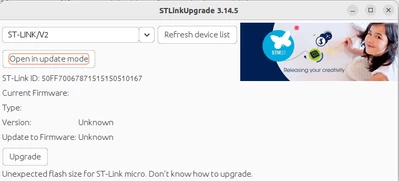
Good afternoon community. I've been dealing with this problem for days and I can't find a solution. It turns out that I migrated to Ubuntu and had to install the STM32CubeIDE Software again. The error appears when I want to communicate to my STM32f072B board. It gives me two errors 1) "ST-LINK is not in DFU mode" and 2) "Unexpected flash size for ST.micro". As I was investigating, I cannot update the ST-LINK Firmware, it does not allow me. I have tried it on another computer, and the updates are done automatically by clicking on "update". But it doesn't allow me. I tried plugging it in with the RESET button pressed, but that didn't fix it either. I don't know where else to look to resolve this error that doesn't allow me to move forward. I hope someone from the community can help me. Thank you so much.
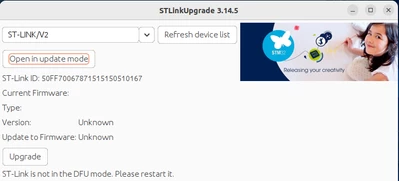
Captura desde 2024-03-26 10-37-47.png


Captura desde 2024-03-26 10-38-37.png


    Best answer by AScha.3

    Hi,

    to which version did you update ?  1.15. ? -> then read here...

    https://community.st.com/t5/stm32cubeide-mcus/with-stm32cube-ide-v1-15-0-update-problem-with-stlink/m-p/652514#M25303

    2 replies

    AScha.3
    AScha.3Best answer
    Super User
    March 26, 2024
    "If you feel a post has answered your question, please click ""Accept as Solution""."
    Tati_rn
    Tati_rnAuthor
    Associate
    March 26, 2024

    Hi. I have the latest version 1.15.0. I had seen that several users also had this problem, but it was because they were using a "ST-Link/V2" clone. Now I'll follow the thread to see if it gets resolved. Thank you very much for the information. Regards.

    Associate
    February 10, 2025

    1. Have the latest STM32CubeProgrammer installed.

    2. Check your USB cable is functioning (some cheaper versions don't implement data lines and their sole purpose is charging!)

    3. Disconnect your USB cable from the target board, press and hold reset, keeping reset held connect the target board to the USB cable.

    3.1 Keeping reset held

    4. Open the STM32CubeProgrammer, Click Firmware Upgrade

    5. Select "Open in Update Mode", ..go from there. 

    This worked for me.


    Visitor II
    May 7, 2025

    work great for me - thanks