Associate II
February 11, 2025
Question

STM Cube ide interface not seen properly

  • February 11, 2025
  • 5 replies
  • 815 views

Left menu tree is not seen properly "General" tab (selected tab) at dark theme. almost I've tried every setting but I can not reach this area. Please help thanks.
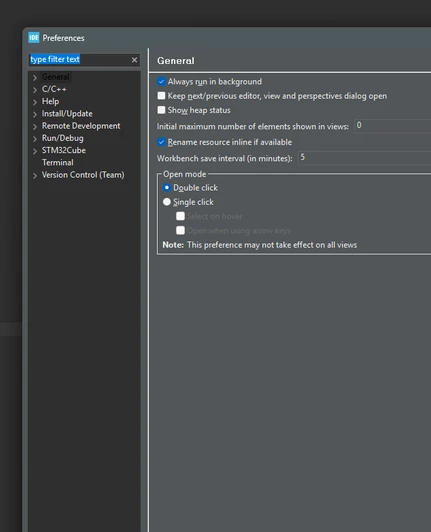

 

Ekran görüntüsü 2025-02-10 152744.png

5 replies

TDK
Super User
February 11, 2025

Works here. What OS, what theme exactly is selected?

TDK_0-1739281907630.png


"If you feel a post has answered your question, please click ""Accept as Solution""."
fixajAuthor
Associate II
February 11, 2025

windows 11. and theme setting is look like this:

fixaj_0-1739282980276.png


if I choice light thema there is no problem:

fixaj_1-1739283086177.png


TDK
Super User
February 11, 2025

Darkest Dark is a third-party theme from the marketplace, yes? Stick the built-in themes. Not a lot ST can do to correct other people's themes. Black text is technically visible. Maybe that's what they intended.

"If you feel a post has answered your question, please click ""Accept as Solution""."
fixajAuthor
Associate II
February 12, 2025

i have uninstall everything and install again. even if I choice "dark" theme from ST, it looks again not seen properly. 

screenshot attached

fixaj_0-1739350262894.png


fixajAuthor
Associate II
February 11, 2025

Are there any solution for full RESET every setting. even if delete .metafile notting change. also uninstall not change anything. are there any way to start as my first install day.

Radosław
Associate II
February 11, 2025

Usually, this requaries creating from scratch your workspace.

fixajAuthor
Associate II
February 12, 2025

I have delete everything and download and install again but problem still there. nothing changed