Associate II
October 10, 2024
Solved

STM32 cube IDE Debugger error

  • October 10, 2024
  • 4 replies
  • 2357 views

I have created a demo project using touch gfx I'm able to flash that project using touch gfx. But when I try to flash that project using Stm32Cube ide it raises an error like "Failed to execute M1 command". Please refer attachments for more details.

Best answer by sai1

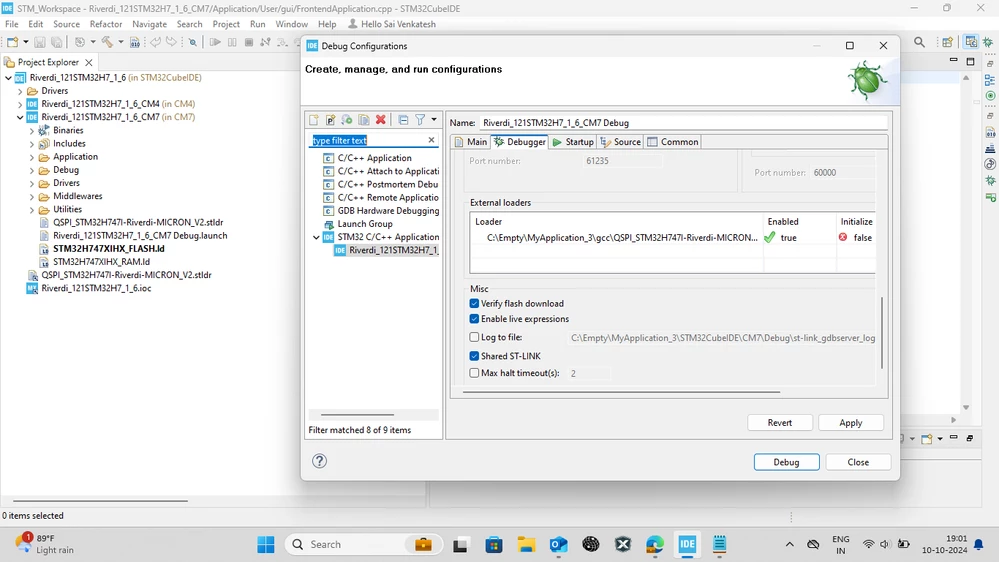
Thank you for your valuable responses. I resolved the issue by making some changes in the debugger configuration. Specifically, I added the QSPI loader file in the external loader option located at "PROJECT_LOC\..\gcc\QSPI_STM32H747I-Riverdi-MICRON_V2.stldr" After debugging it again, everything works well now. Please refer the below attachment. Screenshot (94).png
4 replies

GaetanGodart
Technical Moderator
October 10, 2024

Hello @sai1 ,


In the folder STM32CubeIDE/CM3/Debug, do you find the .elf file?

Under "Run" => "Debug configuration" => "YourBoardName_Appli", what is the C/C++ application specified?

Can you clean and rebuild.


Regards,

Andrew Neil
Super User
October 10, 2024

There should be more details in the 'Console' tab of the IDE:

AndrewNeil_0-1728551320529.png

Please go to the 'Console' tab, select all, copy, and then paste as text here.

Use the 'Preformatted' option for the text - instructions here:

https://community.st.com/t5/community-guidelines/how-to-write-your-question-to-maximize-your-chances-to-find-a/tac-p/725146/highlight/true#M54


A complex system that works is invariably found to have evolved from a simple system that worked.A complex system designed from scratch never works and cannot be patched up to make it work.
mƎALLEm
Technical Moderator
October 10, 2024

Hello,

You need to provide more details. What board are you using?

How you did generate the project?

"To give better visibility on the answered topics, please click on ""Accept as Solution"" on the reply which solved your issue or answered your question."
sai1Author
Associate II
October 10, 2024

I generated code using the TouchGFX tool, but when I tried to open it in STM32CubeIDE, I encountered several issues. Does this capture what you wanted to convey? If you need further adjustments, feel free to let me know!The display board I’m using is the RVT121HVSNWC00-B, and the controller is the STM32H757.

sai1AuthorBest answer
Associate II
October 10, 2024

Thank you for your valuable responses. I resolved the issue by making some changes in the debugger configuration. Specifically, I added the QSPI loader file in the external loader option located at "PROJECT_LOC\..\gcc\QSPI_STM32H747I-Riverdi-MICRON_V2.stldr" After debugging it again, everything works well now. Please refer the below attachment. Screenshot (94).png
