
Associate
July 9, 2025
Solved

STM32 CUBE IDE not getting the relevant options to choose

  • July 9, 2025
  • 1 reply
  • 1113 views

I was using STM Cube IDE version 1.17.0, and I am not getting the option to choose the Stm32Cube in Target Project type by default it is selecting the option of empty. I have been using the same version for few months and I have never faced this issue.. Could you find a solution for this.

Best answer by Ghofrane GSOURI

Hello @AScha.3 

Please try to

-Close STM32CubeIDE

-Delete all those files from your PC: .stm32cufinder, .stm32cubemx, .stm32cubeide and .stm32cube 
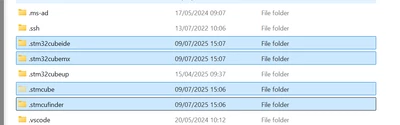
GhofraneGSOURI_0-1752070197948.png

then restart the STM32CubeIDE and retest again.

1 reply

Ghofrane GSOURI
Technical Moderator
July 9, 2025

Hello @nishanth 

I recommend you to use the latest version of STM32CubeIDE 1.19.0

LINK for download

THX

Ghofrane 

To give better visibility on the answered topics, please click on Accept as Solution on the reply which solved your issue or answered your question.
AScha.3
Super User
July 9, 2025

Hi @Ghofrane GSOURI ,

i just tried -> new STM32 project --- but also here in IDE 1.18.1 , only "empty" , no "Cube" project can be selected.

Two weeks ago i made last project, for Cube with ioc , worked as usual.

So what happened ? Online update to no more working setup ? Why ??

"If you feel a post has answered your question, please click ""Accept as Solution""."
Ghofrane GSOURI
Technical Moderator
July 9, 2025

Hello @AScha.3 

Let's try to delete the STM32CubeIDE cache folder (.stm32cubeide) then retest  by launching  STM32CubeIDE again and choose a new workspace , if the issue still there try to delete the .metadata

I will be waiting for your feedback.

THX

Ghofrane

To give better visibility on the answered topics, please click on Accept as Solution on the reply which solved your issue or answered your question.