

Patel.Harsh
Associate
October 16, 2025
Solved

STM32 cube IDE with code generator and CMake

  • October 16, 2025
  • 4 replies
  • 347 views

Hello Experts,

I am looking for a solution in which we can create STM32 project with .ioc file and generate the code but cmake as build tool instead of make.

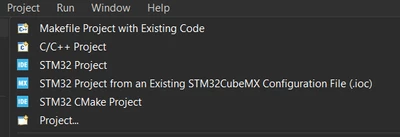
I know we have couple of options while creating new project as follows:
PatelHarsh_0-1760651709094.png

We can either create STM32 project which allows to have .ioc file and can generate code but that is make file-based project.
If create CMake project, then it doesn't have .ioc and code generation feature.

In past, I created STM32 project and on top of that added CMake list files but want to know is there any better option.

Thanks in advance.

Best answer by Pavel A.

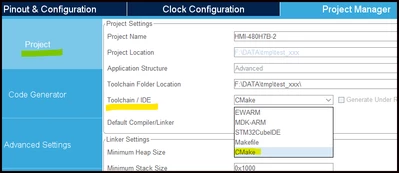
In the standalone CubeMX you can create a CMake project from .ioc.

PavelA_0-1760657309643.png


4 replies

Pavel A.
Pavel A.Best answer
Super User
October 16, 2025

In the standalone CubeMX you can create a CMake project from .ioc.

PavelA_0-1760657309643.png


TDK
Super User
October 17, 2025

> I am looking for a solution in which we can create STM32 project with .ioc file and generate the code but cmake as build tool instead of make.

Create the project with the standalone STM32CubeMX and choose cmake as the target in Project Manager -> Code Generator.

TDK_0-1760662101123.png


"If you feel a post has answered your question, please click ""Accept as Solution""."
Patel.Harsh
Associate
October 17, 2025

Thanks @Pavel A.  @TDK 

I was able to generate code with CMake as build system using your recommended way.
Btw, It would be very helpful if CubeMX IDE is allows to change the Toolchain/IDE to CMake.

Anyways, stretching this thread little bit more:
With the existing way, I am able to build in cubeMX IDE as well as VS code and .elf is created in both cases but the problem is in cubeMX IDE project property not getting option for generation hex for S-record.

Is there any simple solution or I missed any setting??

Inputs appreciated.

Thanks.

Pavel A.
Super User
October 18, 2025

A simple solution is to use CubeIDE (Eclipse) managed projects.

When resorting to unmanaged projects (Makefile or CMake) you're telling the IDE that you want to handle build procedure yourself. So you can just add commands to post-process the build outputs as needed. The required tools  (objcopy and so on) are in the toolchain.


Patel.Harsh
Associate
October 20, 2025

Hi @Pavel A. 

Thanks for quick response.

Just added following lines in CMake as I didn't find post-build input in CMake based project.

# Add custom commands to generate .bin and .hex files

add_custom_command(TARGET ${CMAKE_PROJECT_NAME} POST_BUILD

    COMMAND ${CMAKE_OBJCOPY} -O binary $<TARGET_FILE:${CMAKE_PROJECT_NAME}> ${CMAKE_PROJECT_NAME}.bin

    COMMAND ${CMAKE_OBJCOPY} -O ihex $<TARGET_FILE:${CMAKE_PROJECT_NAME}> ${CMAKE_PROJECT_NAME}.hex

    COMMENT "Building ${CMAKE_PROJECT_NAME}.bin and ${CMAKE_PROJECT_NAME}.hex"

)


Thanks for all your inputs.