Associate
August 21, 2025
Solved

STM32 NUCLEO H755ZIQ USART bug

  • August 21, 2025
  • 1 reply
  • 813 views


I have been trying to deploy a simple ML model on my STM32 NUCLEO H755ZIQ, i've been following a tutorial as am learning right now, but no matter how many times i try i cant seem to shake of these three errors:

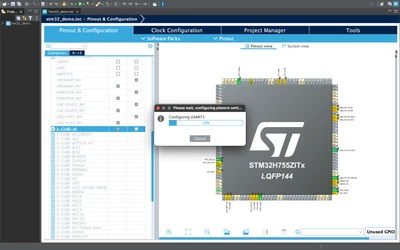
1. when i try to open the XcubeAI  interface a dialogue pops up saying setting up USART3 but it never stops loading, i suppose its a bug but i leave it to the experts to decide what it is. 
2. when i try to validate the code on target board, it gives an error: 

E200(ValidationError): TARGET: Unable to bind the ST.AI runtime with "network" c-model: []
E801(HwIOError): Invalid firmware – /dev/cu.usbmodem11403:115200

3. When am trying to build the model i got this error: 
error: unknown type name 'ai_i8'
error: unknown type name 'ai_handle'
fatal error: bsp_ai.h: No such file or directory

Please help me out and guide me how to run this basic project on my board i found on the internet: https://github.com/stevemac321/5_Class_Embedded_Keras/tree/main


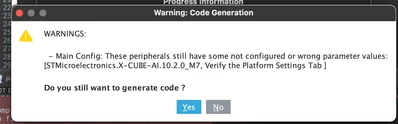
i have attached the bug's screenshot and error screenshots for reference

Screenshot 2025-08-21 at 3.18.22 PM.pngScreenshot 2025-08-21 at 3.46.29 PM.png

vigneshn10_0-1755773483160.png

Best answer by Souhaib MAZHOUD

Hello @vigneshn10 

Regarding the first point, the pop up of "Configuring USART3" is expected as the USART3 is used in Human Machine Interface(VCOM),
To avoid this, you should disable the HMI under Bsp or enable another USART peripheral.
For the other point, they are not related to CubeMX scope. This should be checked with the X-Cube-AI team.

1 reply

Technical Moderator
August 21, 2025

Hello @vigneshn10 

Could you please attach your IOC file in order to investigate the issue?

KR,

Souhaib

To give better visibility on the answered topics, please click on Accept as Solution on the reply which solved your issue or answered your question.
Associate
August 22, 2025

I have attached the IOC file and complete project file too for your reference, thank you. 

Souhaib MAZHOUDBest answer
Technical Moderator
August 26, 2025

Hello @vigneshn10 

Regarding the first point, the pop up of "Configuring USART3" is expected as the USART3 is used in Human Machine Interface(VCOM),
To avoid this, you should disable the HMI under Bsp or enable another USART peripheral.
For the other point, they are not related to CubeMX scope. This should be checked with the X-Cube-AI team.

To give better visibility on the answered topics, please click on Accept as Solution on the reply which solved your issue or answered your question.