
Associate II
July 22, 2025
Solved

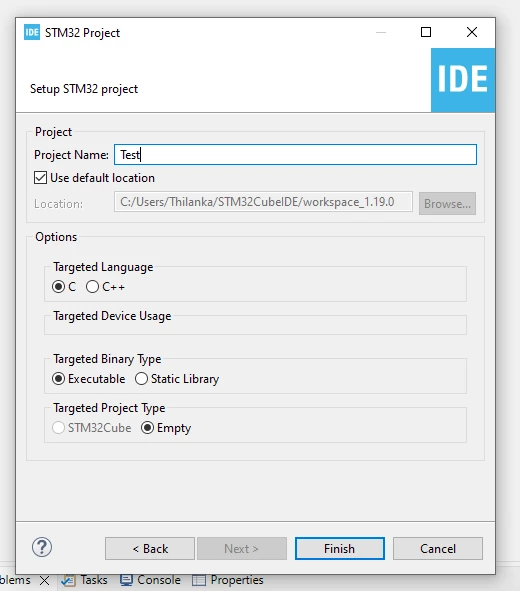
'STM32Cube' project type not available when creating new project.

  • July 22, 2025
  • 2 replies
  • 559 views

HI

i installed  STM32Cube IDE  latest version(1.19.0) in windows 10 platform for testing purpose, i got a problem that when i create a new project it cant select "STM32Cube" type (this is in gray mode), we tried with STM32F103C8T6 and some other chips , how to solve this , is it a bug in the ide ? , only we can create empty projects. please help me on this trouble , i have seen some solutions but it was not worked for me.
 

2025-07-22 Pro.png

Best answer by Andrew Neil

See the pinned post on this known issue:

STM32CubeIDE STM32Cube project creation issue

2 replies

Graduate
July 22, 2025

I have the same issue.  I have v1.19.0 and even tried uninstall/reinstall using latest version of software from website this morning (22/07/2025).  This was a problem with v1.18.1 and v1.19.0 was supposed to have fixed this - but it's cropped up again.  Any advice/help gratefully received as I'm currently stuck and unable to make any progress.

ThslAuthor
Associate II
July 22, 2025

yes , i already installed the CubeMx and checked but the problem still there , there is no any workable solutions found in the forum as well , is it a software bug ?

Andrew Neil
Super User
July 22, 2025

Yes, it is a known issue - see the pinned post:

STM32CubeIDE STM32Cube project creation issue

A complex system that works is invariably found to have evolved from a simple system that worked.A complex system designed from scratch never works and cannot be patched up to make it work.
Andrew Neil
Andrew NeilBest answer
Super User
July 22, 2025

See the pinned post on this known issue:

STM32CubeIDE STM32Cube project creation issue

A complex system that works is invariably found to have evolved from a simple system that worked.A complex system designed from scratch never works and cannot be patched up to make it work.