Rashad Shubita
Associate III
March 31, 2020
Question

STM32CubeIDE can't find DSP static library
  • March 31, 2020
  • 10 replies
  • 6469 views

0693W000000V6PiQAK.jpg0693W000000V6PYQA0.jpg0693W000000V6PTQA0.jpg0693W000000V6POQA0.jpgHii

I have a problem when I add ARM DSP library, the following error appears:

c:\st\stm32cubeide_1.0.0\stm32cubeide\plugins\com.st.stm32cube.ide.mcu.externaltools.gnu-tools-for-stm32.7-2018-q2-update.win32_1.0.0.201904181610\tools\arm-none-eabi\bin\ld.exe: cannot find -lC:/IoT/../L59_stm32_examples/Libraries/CMSIS/DSP/lib/arm_cortexM4lf_math.lib

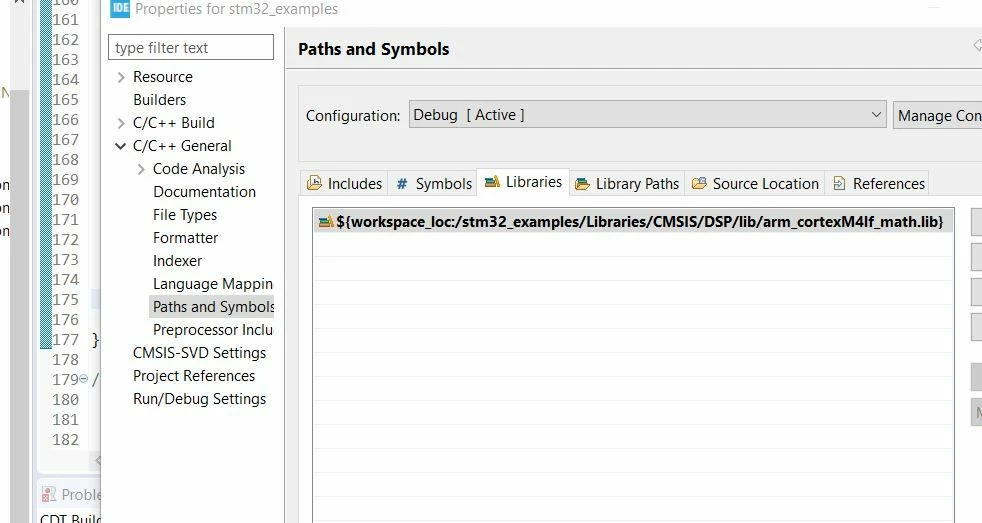
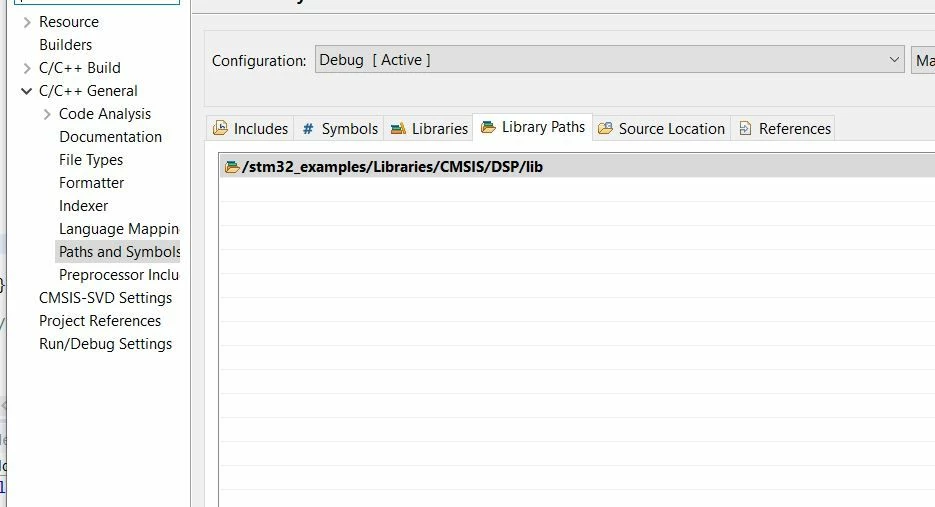
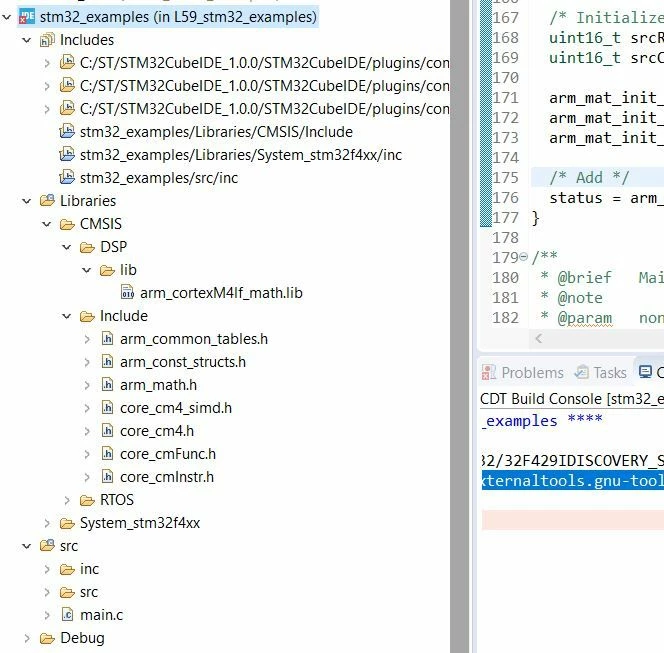
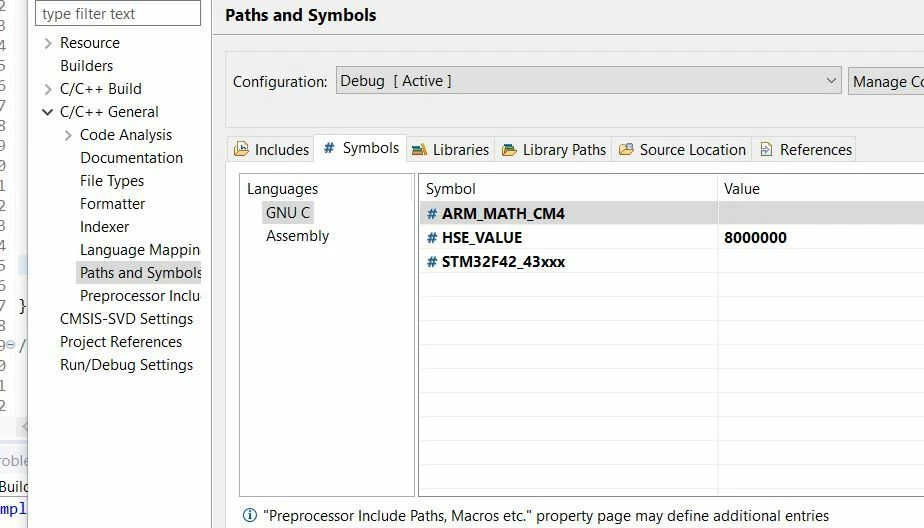
so I tried everything I know but not solved, I add the library to the project, change the name change extinction from.a to .lib, and here is some photo from my project.

Please help and thanks in advance!

10 replies

Rashad Shubita
Associate III
April 1, 2020

Any help?:)

Rashad Shubita
Associate III
April 3, 2020

UPPPP

Rashad Shubita
Associate III
April 6, 2020

Maybe this my third time I asked her and no one wants to help, also I don't think there is a mistake in the way I ask the question, this is why I love other community like E2E TI community.

Thanks a lot everyone!

Álvaro Frutos
Associate
May 11, 2020

Hi! Did you get any help with that? Maybe somewhere else?

I've just asked the same question here. I've also tried adding the libraries manually to the path and it didn't work. I got the same error as you.

But please, check the steps I followed, maybe we can find a solution together.

Álvaro Frutos
Associate
May 11, 2020

By the way I found this reddit link.

Tesla DeLorean
Guru
May 11, 2020

Look for it in the repository directory if your chosen tool isn't pulling a localized copy into your project directory, or looking in the wrong place. My general view is the point of static libraries, and library source is that it doesn't need duplicating six ways to sunday, as it makes management of it more difficult, and increases the temptation to edit/modify them on a per project basis.

STM32Cube\Repository\STM32Cube_FW_F4_V1.25.0\Drivers\CMSIS\Lib\GCC\libarm_cortexM4lf_math.a

STM32Cube\Repository\STM32Cube_FW_H7_V1.7.0\Drivers\CMSIS\Lib\GCC\libarm_cortexM4lf_math.a

STM32Cube\Repository\STM32Cube_FW_H7_V1.7.0\Drivers\CMSIS\Lib\GCC\libarm_cortexM7lfdp_math.a

Suggest y'all get a File Manager or search tools allowing you to navigate files and directory trees to locate things you need to find

Tips, Buy me a coffee, or three.. PayPal VenmoUp vote any posts that you find helpful, it shows what's working..
Álvaro Frutos
Associate
May 11, 2020

I've copied them into my project and linked manually in the project settings.

However, it doesn't feel natural that CubeIDE is copying all headers and adding the associated included automatically and the static libraries have to be added manually.

Rashad Shubita
Associate III
May 15, 2020

Hi �?lvaro Frutos , clive1 (NFA Crew)

Thanks a lot for your help.

I tried everything I can do, but still, nothing works!

I also tried to use the PDMFilter(AN3998)library but the same error appears..Here some photos of the new project configuration.

So I try to test use the pdm2pcm library from cubemx and it seems to work very nicely with no error..also I take a look at how the library is implemented and then I make the same thing but this not solve the problem...

1#######

0693W000001cM5cQAE.jpg

0693W000001cM5mQAE.jpg

2###########

0693W000001cM6VQAU.jpg

0693W000001cM6fQAE.jpg

0693W000001cM6uQAE.jpg

Álvaro Frutos
Associate
May 15, 2020

Hi,

What I did is follow the steps described in my original post to get the include files available. Then, to solve the static library not found problem I just copied the libarm_cortexM4lf_math.a file to my project (without changing the name).

Then I added it to the "Libraries" list. Notice that without the .a extension and without the lib prefix.

0693W000001cMb9QAE.png

Finally I added the path to the library in the "Library Paths".

0693W000001cMcMQAU.png

After this process everything worked.

GMate.11
Associate
July 30, 2021

Hi Alvaro,

thanks for posting the solution. it works on my projects.

I hope the developers of the CUBEIDE take this BUG seriously, because integration of third parties libraries is crucial in real software projects.

Rashad Shubita
Associate III
May 16, 2020

0693W000001cNM5QAM.jpgHi �?lvaro Frutos

First thank you very much..

I try this but still don't work..I don't know what I must do to make it work!

0693W000001cNM0QAM.jpg

0693W000001cNMAQA2.jpg

Álvaro Frutos
Associate
May 16, 2020

Hi Rashad, I think you have to remove the "/$(ProjectName)/" in the Includes path and leave it as "Core/Inc/Inc_Ex".

My solution was for the DSP library. I've never used this other PDMFilter library. SonI don't know if I would be able to help you much more.

Rashad Shubita
Associate III
May 16, 2020

Thanks a lot man �?lvaro Frutos I know you try hard to help me but not always things go right...Thanks 

I know your solution is for the DSP library but I have the same problem in the two libraries.

Now I use pcm2pdm library and it's work fine..just discovering new parameter..even that PDMFilter library has more options such as LPF ..but It works fine for now.

Vselv.1
Visitor II
June 30, 2020

Were you able to fix the issue related to math library (libarm_cortexM4l_math.a)?. I am also getting the same error.