Associate III
August 30, 2024
Solved

STM32CubeIDE how to show hints when calling function

  • August 30, 2024
  • 2 replies
  • 2348 views

Hello,

STM32CubeIDE.

Is it possible to show hints (description of the function, description of the parameters of the function, description of the return value) when calling function?

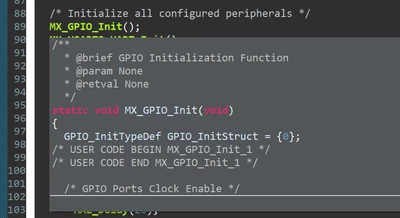
I made this function (see Figure 1) and made documenting comment. When I calling this function or I hover the cursor over the function name a tooltip with the function code pops up, but I want to see description of the function (@brief parameter from documenting comment, see Figure 1).

Figure 1

Mykola_Levun_0-1725009010067.png


Best answer by TDK

It will show the comments before the function definition (not declaration), plus the function code, automatically. This is what "Combined Hover" does. Probably you don't have comments before the definition, only the declaration. Don't think you can change this behavior.

TDK_0-1725014171469.png


2 replies

ST Employee
August 30, 2024

Hello @Mykola_Levun

I think it should be here: windows> preferences

SarraS_0-1725010658708.png


Associate III
August 30, 2024

Hello @Sarra.S,
It is not work (see Figure 2).

Figure 2

Mykola_Levun_0-1725011050616.png

When I check the box next to Documentation, then I get an error "'Documentation' hover uses the same modifier as 'Combined Hover' hover" (see Figure 2). When I uncheck the box next to Combined Hover, then there is no error, but when I calling function or I hover the cursor over the function name, there is no a tooltip.

ST Employee
August 30, 2024

Yes, obviously there is a conflict, since both combined hover and documentation have key modifier blank.. you should set a key modifier for one of them  

TDK
TDKBest answer
Super User
August 30, 2024

It will show the comments before the function definition (not declaration), plus the function code, automatically. This is what "Combined Hover" does. Probably you don't have comments before the definition, only the declaration. Don't think you can change this behavior.

TDK_0-1725014171469.png


"If you feel a post has answered your question, please click ""Accept as Solution""."
Associate III
August 30, 2024

Hello @TDK,
Everything works as you explained. Thank you for explanation.