
최민혁.1
Associate II
October 6, 2020
Solved

STM32CUBEIDE install error

  • October 6, 2020
  • 2 replies
  • 8537 views

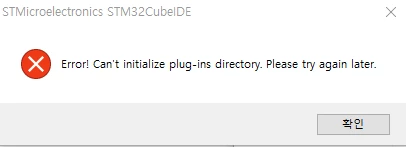
It doesn't install as the phrase pops up. "can't initialize plugins directory. please try again later​"

I've tried everything. Please help me.

window10 64bit

intel core i7-6700 3.4GHz
0693W000004Ik7yQAC.png

Best answer by Markus GIRDLAND

I've also searched around and come to the same conclusion as @KnarfB​ in that it appears to be a common windows issue.

The three solutions I've seen throughout these searches that has worked for some of the users are:

  1. Create a new user without any spaces or non-ASCII characters. This seems to only be relevant if your current user profile uses non-ASCII or spaces!
  2. Clean boot as described on Windows support page here.
  3. %TEMP% folder access rights, which has already been mentioned and tried.

Besides those three I haven't seen any other solutions where users reported that it worked except one where it just suddenly started working again but the user didn't mention any changes made, so not much to be learned from that case.

2 replies

KnarfB
Super User
October 6, 2020

No specific tip, on many machines it works.

Take care that the install path is short and ASCII alphanumeric characters only, e.g. C:\ST\STM32CubeIDE.

Also: search the internet for the error message. Looks like a common windows issue.

최민혁.1
Associate II
October 6, 2020

I also searched. But I do not know the cause.

KnarfB
Super User
October 6, 2020

Sometimes, issues with the access rights of the Windows %TEMP% folder were reported.

Markus GIRDLAND
Markus GIRDLANDBest answer
ST Employee
October 6, 2020

I've also searched around and come to the same conclusion as @KnarfB​ in that it appears to be a common windows issue.

The three solutions I've seen throughout these searches that has worked for some of the users are:

  1. Create a new user without any spaces or non-ASCII characters. This seems to only be relevant if your current user profile uses non-ASCII or spaces!
  2. Clean boot as described on Windows support page here.
  3. %TEMP% folder access rights, which has already been mentioned and tried.

Besides those three I haven't seen any other solutions where users reported that it worked except one where it just suddenly started working again but the user didn't mention any changes made, so not much to be learned from that case.

Visitor II
October 5, 2024

I did all the things you listed above, but it didn't work.
