
Associate III
August 11, 2025
Question

Trace buffer is full - using the SWV viewer

  • August 11, 2025
  • 1 reply
  • 367 views

Hello,


I am using the SWV viewer successfully to output messages from the microcontroller at runtime.


This is a nice tool and usually it works fine. 


When I run an application for a longer time (e.g. over night) I get this error
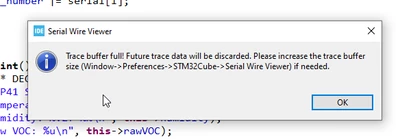
2025-08-11 07_24_40-workspace - TST_SGP41_Drivers_SGP41_API_STM32_SGP41.cpp - STM32CubeIDE.png

I did consider the trace buffer as a buffer like outputting to a UART. 

What is happening there?

regards 

Alexander


1 reply

AScha.3
Super User
August 11, 2025

Hi,

Trace buffer has a fixed size, but you can adjust it to your needs, as written in the message.

If you have the continuous sampling enabled, especially at small time interval, it will fill the buffer very fast, so don't enable/check this in the swv settings.

"If you feel a post has answered your question, please click ""Accept as Solution""."
DocAlexAuthor
Associate III
August 11, 2025

Yes - I have a long log running. Is there a possibility to delete old messages?


what do you mean with "don't enable/check this in the swv settings." ?

AScha.3
Super User
August 11, 2025

In swv settings, top right side, is the sampling enable and the clock divider for it. This you need for the analysis/display the time, where the CPU is busy, in % .

But this also fills up the buffer very fast, so don't enable it.

If you only have messages and it fills the buffer too fast, try reducing the message count and size, or/ and set a bigger buffer size, as shown in the message you got.

( In IDE... preferences...)

I set it at 2 MB or so, should be enough.

"If you feel a post has answered your question, please click ""Accept as Solution""."