
Yasin Yelkovan
Associate II
August 1, 2025
Solved

Tulip Icon

  • August 1, 2025
  • 1 reply
  • 212 views

Hi, 

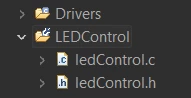
Do you know the meaning of this icon (I think Tulip)?
YasinYelkovan_0-1754033728678.png

Thanks.

Best answer by Yasin Yelkovan

Hi Pavel,


Thank you for your reply. I have solved this problem.

Actually, the link did not help me, but the spirit is similar.

I tried restoring the default settings. Right click on the corresponding file and then get to the "Resource Configuration" tab and select "Reset to Default" option. It worked for me.

YasinYelkovan_0-1754402742074.png


Kindly

1 reply

Pavel A.
Super User
August 1, 2025

It is not tulip. It is a little wrench. Indicates that the folder has overriding build settings inherited from its parent.

https://stackoverflow.com/questions/11796235/what-is-the-meaning-of-this-decorated-folder-icon-in-eclipse-cdt-project-explore


Yasin Yelkovan
Yasin YelkovanAuthorBest answer
Associate II
August 5, 2025

Hi Pavel,


Thank you for your reply. I have solved this problem.

Actually, the link did not help me, but the spirit is similar.

I tried restoring the default settings. Right click on the corresponding file and then get to the "Resource Configuration" tab and select "Reset to Default" option. It worked for me.

YasinYelkovan_0-1754402742074.png


Kindly
