

KAnahar
Associate III
February 25, 2025
Solved

Unable to Connect to STM32H747 After Flashing Code in CubeIDE

  • February 25, 2025
  • 2 replies
  • 2381 views

Hello,

I am using my custom PCB with the STM32H747IIT6 microcontroller. I have set up a JTAG/SWD connection. Initially, when I power up the board and connect via ST-Link, I can access the microcontroller through STM32CubeProgrammer without any issues.

However, after generating a new code in CubeIDE and flashing it onto the MCU, I can no longer connect to the device. I have tried selecting all available connection modes in CubeProgrammer, but none of them work.

"Error: No STM32 target found! If your product embeds Debug Authentication, please perform a discovery using Debug Authentication."

While downloading to the code, terminal giving below messages:

"Opening and parsing file: ST-LINK_GDB_server_a16936.srec

Memory Programming ...

File : ST-LINK_GDB_server_a16936.srec

Size : 131.00 KB

Address : 0x08000000


Erasing memory corresponding to segment 0:

Erasing internal memory sectors [0 1]

Download in Progress:

File download complete

Time elapsed during download operation: 00:00:02.893


Verifying ...

Download verified successfully


Target is not responding, retrying...

Target is not responding, retrying...

Shutting down...

Target is not responding, retrying...

Target is not responding, retrying...

Target is not responding, retrying...

Target is not responding, retrying...

Target is not responding, retrying...

Target is not responding, retrying...

Target is not responding, retrying...

Target is not responding, retrying...

Target is not responding, retrying..."


The only way to regain access is by setting the BOOT0 pin HIGH, performing a Full Chip Erase, and then pulling BOOT0 back to LOW. After this process, I can connect again, but as soon as I flash new firmware, the same issue occurs.

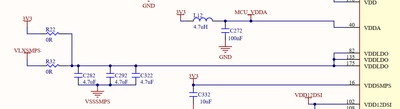
I have attached images of my configuration settings and schematics.
How can I resolve this issue? I have tried both Serial Wire and JTAG modes, but the problem persists.

Thank you!
Best answer by KAnahar

KAnahar_0-1740559904988.png

Maybe i assemblied R32 before. I removed it and assembled to the R22. It is working now. I don't now maybe main reason it is. 

2 replies

TDK
Super User
February 25, 2025

Does your firmware modify flash or go into low power states or reassign the SWD pins? Put a 1s delay before doing any of those things.

"If you feel a post has answered your question, please click ""Accept as Solution""."
KAnahar
KAnaharAuthor
Associate III
February 25, 2025

I activated cortex_m7 modes. It is working but I don't know how to adjust the settings here. What should I set this settings? I have no information about this part.

KAnahar_0-1740493415586.png


TDK
Super User
February 25, 2025

Why do you want to adjust things? There is no "correct" setting. They are there to allow customization based on your needs. If you have no idea, leave them alone at default.

If you want to know more about a particular item, the reference manual is a good place to start. A bit out of scope to explain everything here especially as it's not the issue related to being unable to connect.

"If you feel a post has answered your question, please click ""Accept as Solution""."
urbito
Senior II
February 26, 2025

Since the issue is happening after flashing a code into your MCU, i would suggest you to check the power configuration.

You should check the power circuit you have put in your desing/pcb/schematic and ensure that is the one you are telling to the mcu on RCC configuration.

Hope it helps.

Regards

KAnahar
KAnaharAuthorBest answer
Associate III
February 26, 2025

KAnahar_0-1740559904988.png

Maybe i assemblied R32 before. I removed it and assembled to the R22. It is working now. I don't now maybe main reason it is. 

urbito
Senior II
February 26, 2025

Good that it helped you to point in the right direction.


Give it a try and couple of test and let us know if it keeps working :)


Regards