

Antypas.Peter
Senior
August 30, 2023
Question

Why does STM32CubeIDE use Chromium and peg my CPU so high on MacOS?

  • August 30, 2023
  • 13 replies
  • 5250 views

I'm running IDE version 1.13.1 on MacOS 11.7.1 on a MBP with a dual core 2.8Ghz i7. Unlike every other IDE / CAD package that I use, STM32CubeIDE pegs my CPU really high and spins up the fans even when doing NOTHING. As in, there is no project open, no editors, no HW configuration, literally NOTHING.

Why?
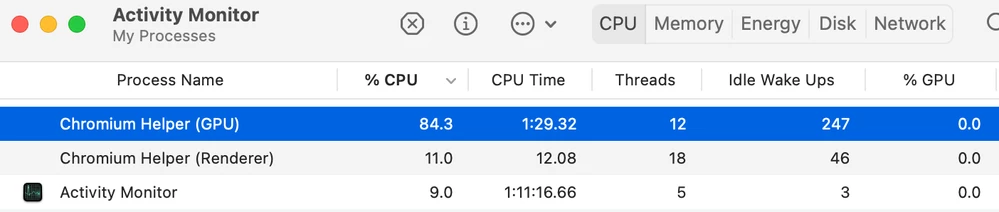
 

Screen Shot 2023-08-29 at 5.05.10 PM.png

    13 replies

    Visitor II
    May 7, 2025

    I've been noticing this a lot too, The mysterious 8 Chromium instances are (a lot of the time anyways) using more CPU than CubeIDE is!

    Darren Legge
    Associate
    June 30, 2025

    The same approach works on macos (presumably linux would be similar). Close STM32CubeIDE and...

    cd ~/.stm32cubeide/.jxbrowser-7.41.4/
    rm -rf *
    cd ..
    chmod 555 .jxbrowser-7.41.4/

    Restart the IDE and enjoy the silence.

    If you need anything that jxbrowser does in future then just reset the write permission (chmod 777) on the .jxbbrowser... folder and STM32CubeIDE will put the files back.

    CTapp.1
    Senior III
    July 24, 2025

    I've just noticed the same thing happens (another 8 Chromium threads) with CubeMX under Windows (and likely MacOS).

    However, that one is not quite so easy to solve as the corresponding .stm32cubeMX folder contains other stuff, but just removing write access to the .jxbrowser folder it contains (like the MacOS fix for the IDE) does the job.

    All posts are made in a personal capacityMISRA C++ ChairMISRA C WG MemberDirector The MISRA Consortium Limited (TMCL)