
Glenn Andrews
Associate II
September 2, 2023
Solved

XPSR register bitfields?

  • September 2, 2023
  • 3 replies
  • 5115 views

Is there a way to split the XPSR register view up so you can see each status bit by its name rather than the 32-bit value?

The SFRs have this feature, why do the general registers not have it enabled by default?

    Best answer by Issamos

    Hello again

    Using CubeIDE this is the best result we can have.
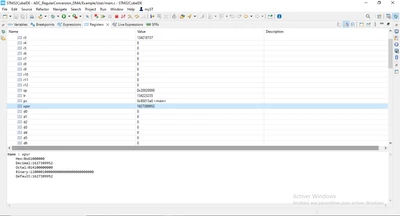
    Capture.PNG

    I hope you can use it with your students.

    Best regards.

    II

    3 replies

    Issamos
    Lead III
    September 2, 2023

    Hello @Glenn Andrews 

    I think this Arm ressource and this post may help. 

    Best regards.

    II

    Glenn Andrews
    Associate II
    September 3, 2023

    Hello @Issamos 

    Thank you for your reply.

    I'm aware of how to decode the binary string using the Arm references and I saw the previous post that implies there is no way to have STM32CubeIDE do it for you. I was hoping that the IDE had been improved in the last 2 years since that post.

    It's a hassle to manually decode the flags when a computer program should be able to parse the register and display it in a human-readable format, especially when it does so already for the memory-mapped peripherals.

    Is this an ST problem or an Eclipse problem?

    Glenn

    Glenn Andrews
    Associate II
    September 3, 2023

    As an example, here's what Keil shows:

    GlennAndrews_0-1693743559201.png


    Glenn Andrews
    Associate II
    September 4, 2023

    I'm sad to see "You can't do this thing other IDEs do." Is the solution, but I guess that's it.

    Issamos
    Lead III
    September 4, 2023

    Maybe we can have a real time interface that recive the XPSR using a communication API and than split the values and give as the feedback we want.

    I hope this happend soon.

    Best regards.

    II

    Glenn Andrews
    Associate II
    September 4, 2023

    @IssamosThe real-time interface already exists in the debugger. That's how you get the xPSR register value updated after every instruction step.

    All that's needed is the representation in the registers window programmed to show the bitifield as well as the 32-bit number, based on processor type.

    I'm amazed Eclipse doesn't already have this in the Registers window, since peripheral registers can split registers up through the SVD file, but it looks like there's no equivalent for CPU registers.

    arus_home_box
    Visitor II
    March 2, 2025

    Hi Glenn, 

    This work-around could be helpful?

    Untitled.png


    Glenn Andrews
    Associate II
    March 2, 2025

    Interesting idea. I might try setting that up for next year's class. 


    Thank you!