
WVerh.1
Associate
April 27, 2020
Solved

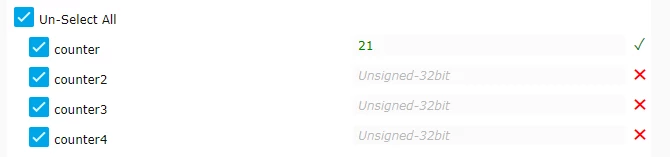
Variables on the write widget are not accessible, they are shown, but they have a red cross next to them.

  • April 27, 2020
  • 4 replies
  • 1302 views

..

This topic has been closed for replies.
Best answer by Landry

Hello @WVerh.1​ ,

You need to fill the field with a valid value. In this case the red cross become a green check, and you can send the command of write.0693W000000WUJ2QAO.png
4 replies

Thierry
Visitor II
April 27, 2020

Dear WVerh.1,

What do you mean by not accessible ? Could you please post a screen capture of the widget ?

Please note that the write widget purpose is not to update the name, the base address or the type of the variables, but only to write some values to some predefined variables.

The first time the dashboard is opened, you should have an input text field between the variable name and the red cross. This text field allows you to enter a value, that could be write to the target by clicking on write button.

Landry
LandryBest answer
Visitor II
April 27, 2020

Hello @WVerh.1​ ,

You need to fill the field with a valid value. In this case the red cross become a green check, and you can send the command of write.0693W000000WUJ2QAO.png

WVerh.1
WVerh.1Author
Associate
April 27, 2020

Ah, thanks a lot, I overlooked the input field, it showed the type of the variable, but I did not realise that it was the actual input field. Problem solved, thanks Thierry !

WVerh.1
WVerh.1Author
Associate
April 27, 2020

Thanks Landry, got it now.
