

Brian H
Senior
April 22, 2024
Question

Connection Error: The server connection is not established.

  • April 22, 2024
  • 5 replies
  • 5581 views

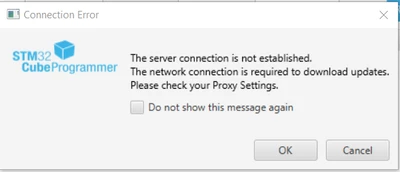
Upon launching STM32 CubeProgrammer today, I encountered this dialog:
BrianH_0-1713799037174.png

In case the image doesn't show, the text reads:

The server connection is not established.
The network connection is required to download updates.
Please check your Proxy Settings.

This thread refers to the same error and is marked "Solved" but the solved problem is actually a different error, described in the same thread.

This message does not interfere with programming, but I'd sure like it to go away.

5 replies

Aziz BRIGUI
Technical Moderator
April 24, 2024

Hello @Brian H


Have you tried checking the "Do not show this message again checkbox" in order to not see the message again ? If you would like to update CubeProgrammer, you have to configure your proxy settings through "help->proxy settings".

AzizBRIGUI_0-1713971422352.png


Aziz

In order to give better visibility on the answered topics, please click on 'Accept as Solution' on the reply which solved your issue or answered your question.
Brian H
Brian HAuthor
Senior
April 24, 2024
  • The problem started randomly, after working fine for a long time
  • I want to know when there is a problem, so I do not check that box
  • I have not changed my proxy settings  
  • My organization does not use a proxy
  • My proxy settings are correct

Perhaps I shouldn't have said "I'd like it to go away."  What I really mean is I want the problem it's describing (connection failure) to be corrected.

Aziz BRIGUI
Technical Moderator
April 25, 2024

Hello @Brian H

In that case, I think we should get more details from you (I tried reproducing the issue on my side using CubeProgrammer v2.15 & v2.16, the pop-up doesn't appear even if proxy settings are not configured properly).

Could you share :

- The CubeProgrammer version you're using (If it's 32 bit CubeProgrammer please specify)

- If you're using 32-bit or 64-bit Windows.

- A screenshot after you click on "Help->Proxy settings->Check connection". 

Thanks in advance,

Aziz

In order to give better visibility on the answered topics, please click on 'Accept as Solution' on the reply which solved your issue or answered your question.
Brian H
Brian HAuthor
Senior
April 25, 2024

In general terms, because things tend to break with updates.  Updating is dangerous.

In this case, the fact that the "Check for updates" feature is broken because of this problem also makes it a bit more cumbersome to update.

Also the fact that the latest version of CubeIDE has issues with ST-Link adapters (see this thread), an issue that cost me half a day of productivity. 

I may actually continue with the approach of turning off that warning, since updating seems especially dangerous right now.

All of that said, it'd be nice to know why this problem is occurring with 2.11.

debugging
Lead
May 30, 2024


Having the same pop up always. Ubuntu 23.10 cube programmer 2.14.0. Not being behind any proxy. Why turning of this messages if it's correct that the connection is dead  ? Update does not work . always a connection error.

debugging_0-1717109891868.png


debugging
Lead
May 30, 2024

Downloaded version 2.16 and update function now works.

helioz
Associate
February 16, 2025

I experienced the same issue with V2.13.

Upgrading to V2.16 fixed it.

I'm on macOS Monterey 12.7.6

ABrid.1
Associate
October 1, 2025

Using Windows 10 64Bits and a fresh install that is STMCubeProgrammer 2.20, the proxy connexion fails as it was previously described.

Fortunatelly, the solution in downgrading to 2.16 has worked.