waclawek.jan
Super User
July 24, 2023
Solved

CubeProgrammer Software update does not work
  • July 24, 2023
  • 10 replies
  • 12886 views

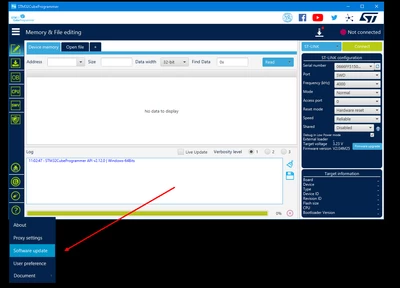
waclawekjan_0-1690189650807.png

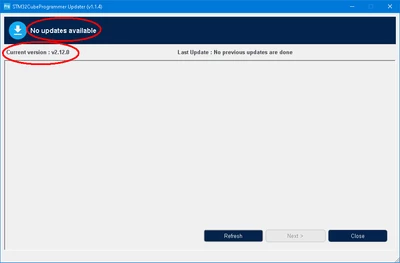
opens this window:

waclawekjan_1-1690189698781.png

whereas according to ST's website, current version is newer, 2.14.0:
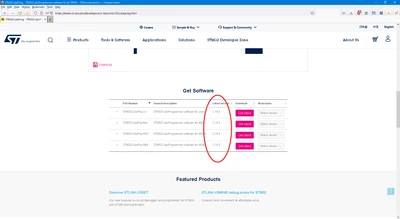
waclawekjan_2-1690189809459.png

Can you please comment on this.

Thanks,

JW

Best answer by Sara BEN HADJ YAHYA

Hello @waclawek.jan 

This is actually a normal behavior that occurs when connection parameters are not set. To solve this issue, please follow the steps below:

  1. Open Connection parameters by clicking on Proxy settings (located above Software updates).
  2. Select the Proxy server type.
  3. Click on Check connection and wait until the connection is verified.

After setting the connection parameters, "Software updates" will then detect the latest updates.

Please let me know if you encounter any issues.

Sara.

10 replies

JMrow.1
Explorer II
July 24, 2023

Hi Jan:

 I saw similar behavior with STM32CubeProgrammer_CLI  (case 00184251 written) with respect to the -help switch response echoing 2.12.0 instead of 2.14.0

regards

Jim Mrowca

Tesla DeLorean
Guru
July 24, 2023

Has this functionality EVER worked? Been multiple complaints about this for over a year and multiple releases.

Tips, Buy me a coffee, or three.. PayPal VenmoUp vote any posts that you find helpful, it shows what's working..
Piranha
Principal III
July 24, 2023

Has this functionality EVER worked?

Nope, it hasn't. As we know, HAL/Cube development process ir absurdly slow because of "rigorous" testing. Apparently the update functionality, which actually does the update, is such a "rare" scenario that it just didn't occur to the testers.

waclawek.jan
Super User
July 24, 2023

I don't know. I don't use CubeProgrammer. I just thought today that I may give it a chance again (I tend to give it a chance once a year roughly, but somehow still can't grow to like it).

JW

waclawek.jan
Super User
July 26, 2023

Okay, thanks. Taking note.

JW

ST Employee
July 28, 2023

Hello @waclawek.jan 

This is actually a normal behavior that occurs when connection parameters are not set. To solve this issue, please follow the steps below:

  1. Open Connection parameters by clicking on Proxy settings (located above Software updates).
  2. Select the Proxy server type.
  3. Click on Check connection and wait until the connection is verified.

After setting the connection parameters, "Software updates" will then detect the latest updates.

Please let me know if you encounter any issues.

Sara.

Piranha
Principal III
July 29, 2023

As 99% of the users doesn't use any proxy servers, the default "Use System Proxy Parameters" should just work, but it doesn't - therefore it is broken. And the "Check Connection" button seems to do nothing at all, except for changing it's icon.

The fact that the developers didn't even tested whether the update works without a proxy server outside of the ST's internal network, shows how pathetically careless the whole development process is. And it also means that nobody of them are actually using that software at home, which shows the background of those people - they are not genuinely interested in these technologies.

waclawek.jan
Super User
July 28, 2023

Hi @Sara BEN HADJ YAHYA ,

Thanks, that indeed worked.

As two other experienced STM32 users ( @Tesla DeLorean@Piranha ) both confirmed that updates don't work - and I believe in both cases it was the proxy being set by default - you may perhaps consider a redesign of the download menu to include the proxy setting. It doesn't have any other purpose anyway (unless the integrated spying feature uses it too, but that ought to be removed anyway).

But, to be honest, I recommend a complete redesign of the CubeProgrammer's UI, as it's "modern" (i'd rather call it childish, immature) design with randomly scattered and marked controls, instead of industry standard menus, are very confusing, hard to use, and require unnecessary learning.

And NOBODY needs facebook, twitter, youtube, and [that fourth strange shape] connectivity from a *programming tool*, so just delete those.

JW


ST Employee
August 1, 2023

Hello @waclawek.jan ,

I have submitted a change request for the Updater redesign and will keep you updated on any progress or developments.

Internal ticket number: 158493 (This is an internal tracking number and is not accessible or usable by customers).

Sara.

bb1
Explorer
July 28, 2023

Well this is broken. I require no proxy and my system proxy settings are set to none.

  • Use System Proxy Parameters (default option) - checking the connection succeeds but updates don't work
  • Manual with an unreachable IP address as the proxy - checking the connection still succeeds and updates don't work
  • Manual with an unreachable IP address as the proxy and all networks disconnected - checking the connection finally fails (the first time I tried this case the check succeeded but it was because Wi-Fi turned on after I pulled the network cable)
  • No proxy - checking the connection succeeds and updates work
waclawek.jan
Super User
August 1, 2023

Thanks @Sara BEN HADJ YAHYA .

JW

Piranha
Principal III
October 6, 2023


I can get this one, but it freezes and doesn't work anyway.

Piranha_2-1696621245989.png

And now at startup the application shows this:

Piranha_1-1696621091587.png

But they cannot implement proper functionality even for such a simple message box! The OK and Cancel buttons both are just closing the message box. Why are there two buttons, if both do the same thing? And the window close button doesn't do anything at all - it doesn't even close the message box. So why is it active then? Or why doesn't it function as in normal software - doing the same as OK or Cancel, depending on the buttons present?

US4LKW
Explorer
July 25, 2024

Now I can't download it. After reading the license agreement and confirming, nothing happens. I tried using other browsers and also tried downloading different versions, but the result is the same.

Also, when trying to update from the program, I still can't do it.
update_error.jpg