

Error: failed to download Segment[1] when programming with USB
I have written a program in the STM32CubeIDE V1.16, creating a .elf file for the STM32H723.
I then followed the Phils Lab tutorial https://www.youtube.com/watch?v=VlCYI2U-qyM to program the Nucleo development board using USB using STM32CubeProgrammer V2.17.
When I pull the boot pin high and press reset, it goes into boot mode, and the programmer detects it.
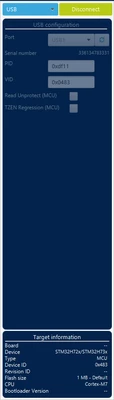
However, when I download the elf file, I get these errors:
Error: failed to download Segment[1]
Error: failed to download the File
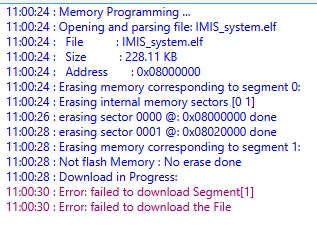
It used to be segment [2] that failed, but I updated CubeIDE and and .IOC file and it changed to segemet[1].
I updated all my versions and followed solutions in other similar questions, though these are segment[0] errors
https://community.st.com/t5/stm32cubeide-mcus/stm32cubeide-upgrade/td-p/628738
Some solutions say to change a setting in the CubeProgrammer, but there's no obvious settings option I can change.
The code uploads into the MCU when the LED turns on, which indicates it does work. However, I want to clarify this error so that there isn't an issue in the future.
Thanks in advance for any help