

Duckpaddle
Associate III
August 26, 2025
Solved

Having chalenges uploading to the STM32H747i_DISCO demo board

  • August 26, 2025
  • 1 reply
  • 2937 views

Hoping someone could help.  I did a full erase on the stm32h747i_disco from the stm32cube programmer.  I attempted (several times) to upload the STM32Cube_Demo-STM32H747I-DISCO-V1.0.0_FULL.hex and got the following error:

14:09:58 : Opening and parsing file: STM32Cube_Demo-STM32H747I-DISCO-V1.0.0_FULL.hex
14:09:58 : Memory Programming ...
14:09:58 : File : STM32Cube_Demo-STM32H747I-DISCO-V1.0.0_FULL.hex
14:10:00 : Size : 58.38 MB
14:10:00 : Address : 0x08000000
14:10:00 : Download in Progress:
14:10:04 : Error: failed to download Sector[0]
14:10:04 : Error: failed to download the File
14:10:05 : Memory [0x08000000 : 0x08200000] - Checksum : 0x139CE03C

Does anyone have a suggestion?
Best answer by mƎALLEm

Hello,

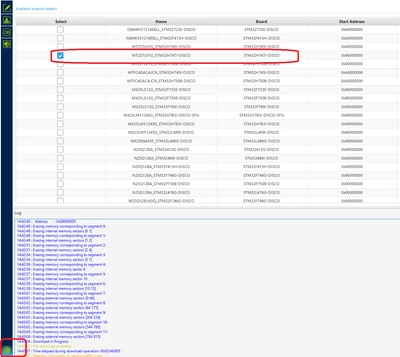
Did you enable the flash loader of the external QSPI memory before uploading the hex file??

mALLEm_0-1756302400969.png

The part of the graphics in that demo is located in the external memory (QSPI).

1 reply

Technical Moderator
August 27, 2025

Hello @Duckpaddle 

Which CubeProgrammer version used? Make sure to use the latest one.

Check the flash bank mode in the configuration settings.

Please have a look at this post that may help you.

If possible, share the log file.

"When your question is answered, please close this topic by clicking ""Accept as Solution"".ThanksImen"
Duckpaddle
Associate III
August 27, 2025

Thank you for your quick response.

I am using the v2.20.0 version of the STM32CubeProgrammer.  I have attached as a screen shot.  I have also attached the log file where I attempted to program the board twice.  

I am using the Demo Hex file from ST Micro for this board.


Thank you again for your help,

George

CubeProgrammerVersion.PNG

mƎALLEm
mƎALLEmBest answer
Technical Moderator
August 27, 2025

Hello,

Did you enable the flash loader of the external QSPI memory before uploading the hex file??

mALLEm_0-1756302400969.png

The part of the graphics in that demo is located in the external memory (QSPI).

"To give better visibility on the answered topics, please click on ""Accept as Solution"" on the reply which solved your issue or answered your question."