

CDenk.1
Associate
August 14, 2021
Question

How to change scaling or font size on Linux

  • August 14, 2021
  • 4 replies
  • 3127 views

Hi,

StM32CubeProgrammer shows up realy tiny on my Linux laptop screen (2560:1600), please see screenshot.
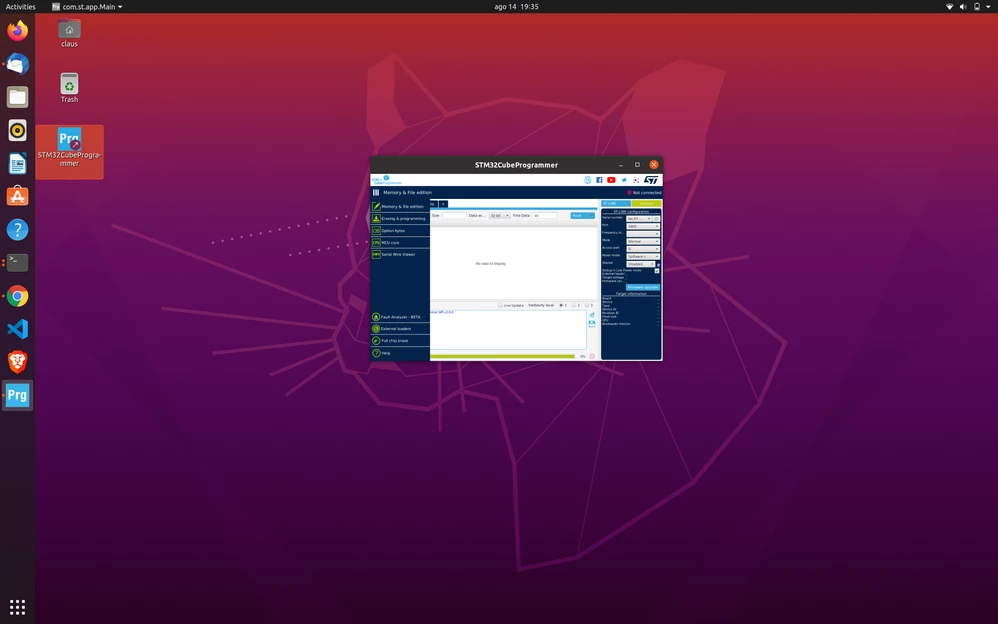
0693W00000D2UZCQA3.pngSomething similar happened to STM32CubeMx inside the IDE, I could fix that starting the IDE with

GDK_DPI_SCALE=0.5 GDK_SCALE=2 /opt/st/stm32cubeide_1.7.0/stm32cubeide

How to display the Programmer with a reasonable size? The text is almost impossible to read.

Thanx for any help!

This topic has been closed for replies.

4 replies

Houda GHABRI
ST Employee
August 19, 2021

Hi CDenk.1,

I 'm not able to reproduce this issue but may be you can try to modify the script launcher to upscale the size.

Can you please locate the launcher script STM32CubeProgrammerLauncher under CubePRogrammer install folder and modify this line as follow :

$DIR/jre/bin/java -jar -Dsun.java2d.dpiaware=false $DIR/STM32CubeProgrammerLauncher

Please try and tell me if it is OK.

Houda

CDenk.1
CDenk.1Author
Associate
November 29, 2021

Dear Houda, sorry I did not see your answer til today. I tried your suggestion but this does not seem to work due to the java version used. It has no effect on the scaling behaviour of the app.

MBade.1
Visitor II
January 16, 2022

Has anyone found an answer to this? I have a 4k screen, running Ubuntu, and the application is completely unusable because it is so small. I have tried several workarounds and none work.

@Houda GHABRI​ ?

miles f
Associate
April 20, 2023

I don't have a solution to this issue, but have found a few additional reports of this bug. Linking here for reference:

https://community.st.com/s/question/0D53W00002BdiSmSAJ/support-hidpi-screens