Associate
September 10, 2025
Solved

How to delete file path history in STM32CubeProgrammer

  • September 10, 2025
  • 1 reply
  • 351 views

Hi


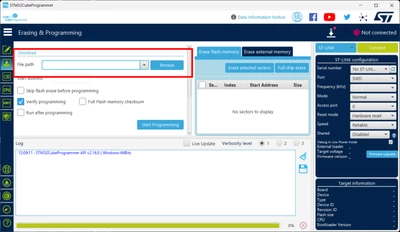
There is a file path window on the Erasing&Programming page.

I would like to reset the history because the path history increases every time I change the file I write.

Is there a way to reset the history?

 STM32CubeProgrammer Version:v2.16.0

OS:Windows11

Regard

STM32CubeProgrammer Erasing and Programming.png

Best answer by Peter BENSCH

Although there is currently no built-in option to delete the file path list within the STM32CubeProgrammer, it is possible to edit it manually in the file config.properties. There you will find a line beginning with downloadFileList= which lists the complete paths of the last files separated by commas. In Windows, this file is typically located in the directory

%USERPROFILE%\STMicroelectronics\STM32CubeProgrammer

%USERPROFILE% refers to your own user directory, where settings for various programmes are typically stored. Simply paste this path into the address bar of Explorer and press Enter.

WARNING: You are fully responsible when accessing this directory, so please be very careful not to destroy your settings or those of the respective user.

Hope that helps?

Regards
/Peter

1 reply

MGogr.1
Senior
September 10, 2025

Currently there seems to be no option of deleting the path history.

ToshikiAuthor
Associate
September 10, 2025

Hi

Thank you for your reply.

I realized there were no options.

Regard

Peter BENSCH
Peter BENSCHBest answer
Technical Moderator
September 12, 2025

Although there is currently no built-in option to delete the file path list within the STM32CubeProgrammer, it is possible to edit it manually in the file config.properties. There you will find a line beginning with downloadFileList= which lists the complete paths of the last files separated by commas. In Windows, this file is typically located in the directory

%USERPROFILE%\STMicroelectronics\STM32CubeProgrammer

%USERPROFILE% refers to your own user directory, where settings for various programmes are typically stored. Simply paste this path into the address bar of Explorer and press Enter.

WARNING: You are fully responsible when accessing this directory, so please be very careful not to destroy your settings or those of the respective user.

Hope that helps?

Regards
/Peter