

Nick van IJzendoorn
Associate III
January 17, 2022
Solved

Howto reset option bytes on STM32U575xx?

  • January 17, 2022
  • 3 replies
  • 2604 views

I'm working on a project where we are using the new STM32U575xx series. Now I created a bootloader and wanted to write protect the bootloader section. However I'm not able to disable the write protection using the ST-Link v3 and STM32CubeProgrammer.

If I try to unlock the write protection I get the following error:
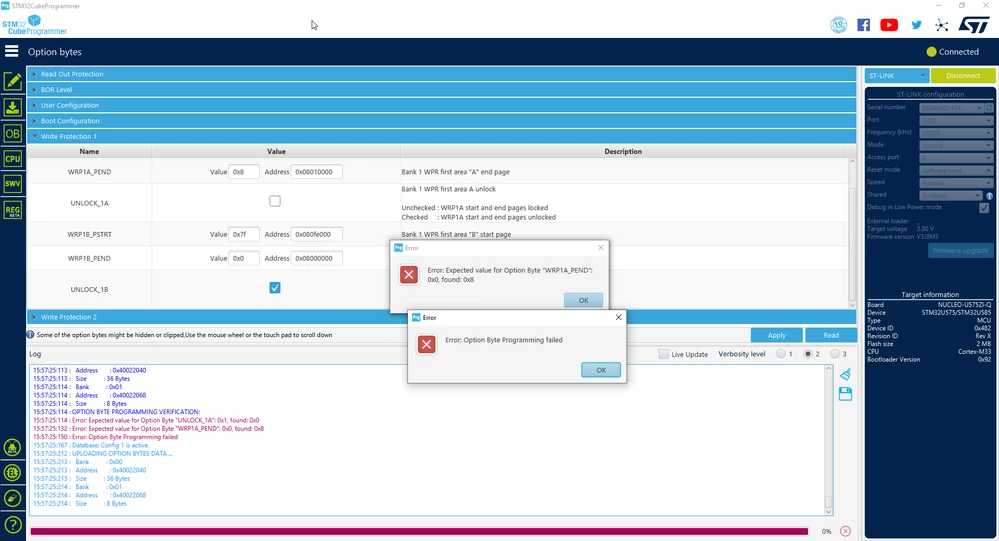
0693W00000JMFS0QAP.pngIs there a way to fix this problem? Or do I have to file a bug report in the support section? How long will it take to fix this? I'm kind of stuck now because also the J-Link STM32 Unlock application doesn't support the STM32U575xx yet...

This topic has been closed for replies.
Best answer by Nick van IJzendoorn

Sorry, I first had to read the reference manual as answered in: https://community.st.com/s/question/0D53W00001JWUPVSA5/resetting-option-bytes-of-stm32u575xx-with-ram-application

While trying to do it with a custom application I got it working.

  1. First increase the RDP to level 1 press apply
  2. Now set RDP to level 0 and check the UNLOCK checkbox and press apply
  3. The write protection is now disabled

Please not that you are not allowed to change the start and end offset, if you want to reset those you will have to do this in step 4.

3 replies

Nick van IJzendoorn
Nick van IJzendoornAuthorBest answer
Associate III
January 18, 2022

Sorry, I first had to read the reference manual as answered in: https://community.st.com/s/question/0D53W00001JWUPVSA5/resetting-option-bytes-of-stm32u575xx-with-ram-application

While trying to do it with a custom application I got it working.

  1. First increase the RDP to level 1 press apply
  2. Now set RDP to level 0 and check the UNLOCK checkbox and press apply
  3. The write protection is now disabled

Please not that you are not allowed to change the start and end offset, if you want to reset those you will have to do this in step 4.

Nick van IJzendoorn
Associate III
January 20, 2022

However after removing the write protection using these steps I am still not allowed to program the previous locked pages. Any idea on how to fix this?

Nick van IJzendoorn
Associate III
January 26, 2022

After steps 1 to 3 you can reset the WRPStart and WRPEnd to there factory default to disable the write protection. There factory default is 0x7f for start and 0x00 for end.