
Associate III
September 8, 2022
Question

Issue in buffer to write before programming external flash

  • September 8, 2022
  • 3 replies
  • 3650 views

Hi everyone,

I've a strange problem when I write to an external flash memory (S29GL512T) throught a STM32F767 MCU and a custom external loader loaded in the STM32CubeProgrammer.

After debugging the external loader several times, I've found that the contents of the buffer that CubeProgrammer gives me for the write operation has partially invalid data. I have done this test in 2 contexts:

  • Using FMC to programm external flash. In this context I have invalid data before programming the external flash. 
  • Without using FMC. This context is only for check the content of buffer without FMC interfere and the content matches.

So I don't understand why, when you use FMC to program the external flash, the contents of the given buffer are manipulated.

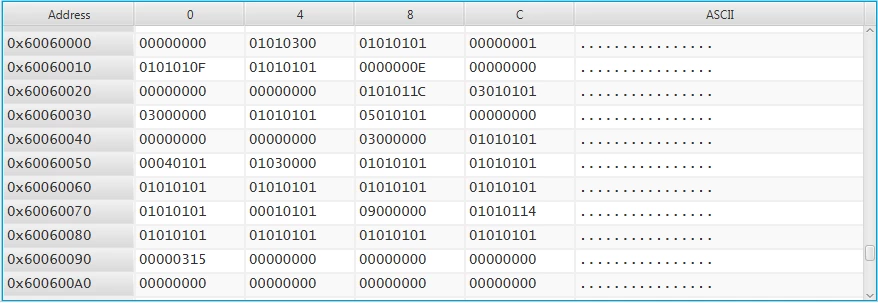
This follows shows the original data I want program at address 0x60060000 and the log generated during the programm procedure.
0693W00000SunQRQAZ.png 

# Sector erase 0
Init...<LF>
S29GL512T11 found!<LF>
Read mode<LF>
Sector erase at 0x0<LF>
Sector erase done!<LF>
 
# Sector erase 1, 2, 3
Init...<LF>
S29GL512T11 found!<LF>
Read mode<LF>
Sector erase at 0x20000<LF>
Sector erase done!<LF>
Sector erase at 0x40000<LF>
Sector erase done!<LF>
Sector erase at 0x60000<LF>
Sector erase done!<LF>
 
# Programm 16 bytes at 0x60000000
Init...<LF>
S29GL512T11 found!<LF>
Programming at 0x60000000<LF>
Programming size:16<LF>
Pointer Buffer 0x20004f00<LF>
 
# Programm 16 bytes at 0x60000000
# I think in this scenario the whole of data to program is loaded in RAM and splitted in 2 consecutive buffers (one with 149044 bytes and the other 149040 bytes). Then I can check a knowed position of this buffer if it matches with a original data (In this case, I use the 0x60060000 addres beacuse never matches with betwen buffer and the original content).
Init...<LF>
S29GL512T11 found!<LF>
Programming at 0x60020000<LF>
Programming size:149044<LF>
Pointer Buffer 0x20004f00<LF>
# Check the content of buffer where represents the content of 0x60060000. Has an invalid data 0x997dccd9b != 0x00000000.
0x20044f00: 0x997dcd9b<LF>
Programming at 0x60044634<LF>
Programming size:149040<LF>
Pointer Buffer 0x20029534<LF>
# Check again the content of buffer where represents the content of 0x60060000. Has an invalid data 0x997dccd9b != 0x00000000.
0x20044f00: 0x997dcd9b<LF>

3 replies

Tesla DeLorean
Guru
September 8, 2022

+256KB is beyond the scope of the passed buffer

Tips, Buy me a coffee, or three.. PayPal VenmoUp vote any posts that you find helpful, it shows what's working..
NickjmasAuthor
Associate III
September 8, 2022

Hi Tesla DeLoren,

I'm not sure about this, to start write at 0x60020000 the buffer points to 0x200004f00 and have a size of 149044 bytes, and the next block data to write the buffer pointer starts at 0x20029534 (0x200004f00 + 149044 bytes) which seems 2 buffer are consecutive and has all data loaded. See the next log based to see the context of every Write call.

# First write at 0x60020000
Programming at 0x60020000<LF>
Programming size:149044<LF>
Pointer Buffer 0x20004f00<LF>
# Second write at 0x60044634
Programming at 0x60044634<LF>
Programming size:149040<LF>
Pointer Buffer 0x20029534<LF>

Best regards

NickjmasAuthor
Associate III
September 8, 2022

Hello,

I've just tryed with the old STM32Utility, loading the same external loader and with this context I haven't any problem to write the desired data. In this case, the write procedure at 0x60020000 is made once time giving the whole of data.

Init...<LF>
S29GL512T11 found!<LF>
 
Read mode<LF>
Sector erase at 0x20000<LF>
Sector erase done!<LF>
Sector erase at 0x40000<LF>
Sector erase done!<LF>
Sector erase at 0x60000<LF>
Sector erase done!<LF>
 
Init...<LF>
S29GL512T11 found!<LF>
Programming at 0x60020000<LF>
Programming size:298084<LF>
Pointer Buffer 0x20004ee4<LF>
# The content matches between buffer and orignial data
0x20044ee4: 0x0<LF>
0x60060000: 0x0<LF>

Tesla DeLorean
Guru
September 8, 2022

CM7

Make sure the cache isn't enabled

Don't read the value in the first pass if it is outside the scope of the buffer passed

Tips, Buy me a coffee, or three.. PayPal VenmoUp vote any posts that you find helpful, it shows what's working..
NickjmasAuthor
Associate III
September 8, 2022

Hi Tesla DeLorean,

Is disabled both instruction and data cache. Also I have an MPU region dedicated for external nor flash.

static void MPU_Config(void) {
	MPU_Region_InitTypeDef MPU_InitStruct;
 
	/* Disable the MPU */
	HAL_MPU_Disable();
 
	MPU_InitStruct.Enable = MPU_REGION_ENABLE;
	MPU_InitStruct.BaseAddress = 0x60000000;
	MPU_InitStruct.Size = MPU_REGION_SIZE_16MB;
	MPU_InitStruct.AccessPermission = MPU_REGION_FULL_ACCESS;
	MPU_InitStruct.IsBufferable = MPU_ACCESS_BUFFERABLE;
	MPU_InitStruct.IsCacheable = MPU_ACCESS_NOT_CACHEABLE;
	MPU_InitStruct.IsShareable = MPU_ACCESS_SHAREABLE;
	MPU_InitStruct.Number = MPU_REGION_NUMBER0;
	MPU_InitStruct.TypeExtField = MPU_TEX_LEVEL0;
	MPU_InitStruct.SubRegionDisable = 0x00;
	MPU_InitStruct.DisableExec = MPU_INSTRUCTION_ACCESS_ENABLE;
 
	HAL_MPU_ConfigRegion(&MPU_InitStruct);
 
	/* Enable the MPU */
	HAL_MPU_Enable(MPU_PRIVILEGED_DEFAULT);
}
 
int Init(void) {
	/* MCU Configuration--------------------------------------------------------*/
	/* MPU config */
	SCB_DisableICache();
	SCB_DisableDCache();
 
	MPU_Config();
 
	/* ... */
 
	return 0;
}

Regards

NickjmasAuthor
Associate III
May 17, 2024

Hello again,

I come back with a similar issue with a different memory, now is a NOR flash S29GL128S.

I can read and write any address of external memory properly. Also I can do sector erase and full chip erase. A corruption data to write happens when it tries a program block of 342324 bytes in the external memory. I guess CubeProgrammer splits the block in 2 blocks because Write function is called 2 times, one with 171164 bytes and another with 171160 bytes. In the second time when Write function is called is when I catch a corruption data.

int Write(uint32_t Address, uint32_t Size, uint16_t* Buffer) {
	uint32_t i_write = 0;
	uint32_t word = 0;
	uint16_t data;

#if DEBUG
	PRINT_HEX_EX("Programming at ", Address);
	PRINT_DEC_EX("Programming size:", Size);
#endif

	for (i_write = 0; i_write < Size; i_write += 2) {
		data = Buffer[word];
#if DEBUG
		// Here is where checks data of some address where threre's corruption
		if (Address == 0x6004EE80) {
			PRINT_HEX(data);
		} else if (Address == 0x6004EEA0) {
			PRINT_HEX(data);
		}
#endif

		HAL_NOR_Program(&hnor1, (uint32_t *) Address, &data);
		if ((HAL_NOR_GetStatus(&hnor1, Address, NOR_DEV_TIMEOUT))
				!= HAL_NOR_STATUS_SUCCESS) {
			HAL_NOR_ReturnToReadMode(&hnor1);
#if DEBUG
			PRINT_TEXT("Progamming Error!");
#endif
			return 0;
		}
		Address += 2;
		word++;
	}

#if DEBUG
	PRINT_TEXT("Progamming done!");
#endif

	return 1;
}


The following image is a log generated by the external loader. The lines "0x3401<LF>" and "0xb510<LF>" is the data I was checking to see if there's corruption or not. The correct lines should be "0x0<LF>" 

Nickjmas_0-1715946159852.png

Removing HAL_NOR_Program from the Write function, there's no corruption data. Also using an old memory compatible with this actual there's no corruption.

Another strange thing is if I use the external loader with the old tool StLink Utility also there's no corruption. The only thing I can see is there is only one call of Write function instead of 2 times in CubeProgrammer. The following image is the log generated by external loader when StLink Utility is used

Nickjmas_1-1715946688793.png

I don't know where is the problem, if there's wrong in my external loader or there's some bug in the CubeProgrammer.

Visitor II
August 13, 2025

Were you ever able to figure this out? I'm seeing what I think is the same issue.

Regardless of the file size that I attempt to write the STMCubeProgrammer seems to split the file in 2 and call my external loader's Write function twice. For the first call everything is as expected and the buffer passed to Write is filled with correct data. The second Write call is passed a buffer that is not filled with the remaining data. The buffers are sequential and the sizes of the write calls match the expected size of the file. It seems to be that the second half of the file is just never written to the mem specified as the buffer address. 

Is there a way to set STMCubeProgrammer to limit to a single Write?

Tesla DeLorean
Guru
August 13, 2025

The file data has to go via the SRAM on the STM32, the External Loader also lives and executes in the SRAM. The buffering size is therefore half the size of the remaining SRAM.

>>Is there a way to set STMCubeProgrammer to limit to a single Write?

No.


There may have been bugs with older versions, but not seen credible reports of it not moving data properly recently.

You'd need to make a more rigorous report with data, verbose logs from STM32 Cube Programmer, and probably telemetry/diagnostics from your external loader's view point. Something ST can analyze and replicate.

Tips, Buy me a coffee, or three.. PayPal VenmoUp vote any posts that you find helpful, it shows what's working..