
Associate
November 5, 2025
Solved

Issues Connecting Discovery board to STM32CubeProgrammer

  • November 5, 2025
  • 3 replies
  • 427 views

OS: Ubuntu 24.04.2

CubeProgrammer Version: 2.20.0

Board: STM32F407G-DISC1

Firmware Version: V15J63M63

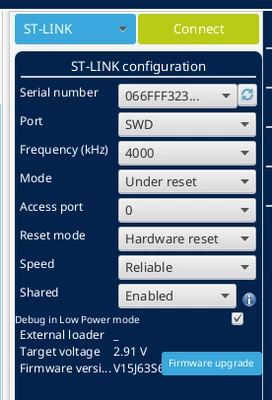
I am having intermittent connectivity issues with my discovery board and the STM32 IDE/Programmer. My system is able to detect the discovery board as it shows up when using the Linux command: lsusb. When launching the CubeProgrammer application it is able to (sometimes) detect the board after configuring the settings properly; after which the board setting are populated (see pic below)
MPsyko_0-1762299763537.png

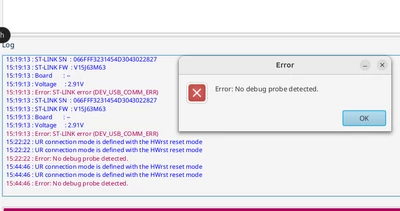
When trying to connect to the board, however, I receive fluctuating error message (see pic below). It is either the DEV_USB_COMM_ERR or the No debug probe detected errors. I am not sure what causes the errors to change but it usually happens when I reset the board because CubeProgrammer was unable to detect it and I am attempting to reestablish the connection (just having the board detected, not pressing the CONNECT button).
MPsyko_1-1762299916829.png

The LD1 color is also intermittent and goes from RED to GREEN depending on how the board resets and if it establishes a connection with the computer/CubeProgrammer. The board is receiving 5V through the CN1 (mini-usb) port so it doesn't seem like it's a power issue. The jumpers on CN3 are connected properly. It is worth noting the when the board is detected (but not connected) and I attempt to upgrade the ST-LINK/V2 firmware using the Open in update mode button, the board suddenly disconnects but when I exit out of the firmware upgrade window, it becomes detectable again. Strange behavior.

Any help with troubleshooting or configuration that I may have missed? Any info/help is appreciated.


Best answer by MPsyko

UPDATE

So I ended up buying a brand new board and everything worked as soon as I plugged it in. The STM32CubeProgrammer and STM32CubeIDE were able to connect properly and I was able to successfully debug and load my programs to the board 


Still not sure what exactly is wrong with the old board but at some point after verifying voltages and settings it was just easier to get another board to compare/troubleshoot and lo and behold the original board was the problem instead of some setting or step I was missing.

A bit annoying and frustrating but after exhausting my available resources I didn't have many options. Not sure if this is helpful to anyone who encounters a similar issues but sometimes it helps to have a spare board to compare against. Lesson learned I guess.

3 replies

MPsykoAuthor
Associate
November 6, 2025

UPDATE

I plugged the board into my Windows computer and although the the detection of the board is still intermittent, when it is detected and I press the Connect button, I receive a new error: DEV_TARGET_CMD_ERR.


While there hasn't been much progress in terms of connecting the board, this seems to suggest more and more that this is a hardware issue instead of a setup/software issue.

If anyone can provide any insight or maybe some experience they have had with this error that would be appreciated.

Andrew Neil
Super User
November 6, 2025

How old is the board?

The USB connection can be a bit fragile ...

A complex system that works is invariably found to have evolved from a simple system that worked.A complex system designed from scratch never works and cannot be patched up to make it work.
MPsykoAuthor
Associate
November 6, 2025

Not that old, I bought it within the past year. The board code (revision?) is MB997E.

Also thinking it's maybe a cable issue? I'm using an old USB-mini cable that was used to charge a PS3 controller. Think I need to purchase a new one to test out but I've read there are charging cables and data cables but no reliable way to differentiate them. Are there any recommended USB-mini data cables that I could purchase from Best Buy or someplace like that?

Edit: I am using a usb-mini (CN1) cable, not a usb-micro (CN5) cable

MPsykoAuthor
Associate
November 6, 2025

I found another USB-Mini cable lying around and the connection is more stable but I still receive the DEV_TARGET_CMD_ERR...

MPsykoAuthorBest answer
Associate
November 13, 2025

UPDATE

So I ended up buying a brand new board and everything worked as soon as I plugged it in. The STM32CubeProgrammer and STM32CubeIDE were able to connect properly and I was able to successfully debug and load my programs to the board 


Still not sure what exactly is wrong with the old board but at some point after verifying voltages and settings it was just easier to get another board to compare/troubleshoot and lo and behold the original board was the problem instead of some setting or step I was missing.

A bit annoying and frustrating but after exhausting my available resources I didn't have many options. Not sure if this is helpful to anyone who encounters a similar issues but sometimes it helps to have a spare board to compare against. Lesson learned I guess.